EduMittar – School Management ERP with Student, Parent & Staff Apps
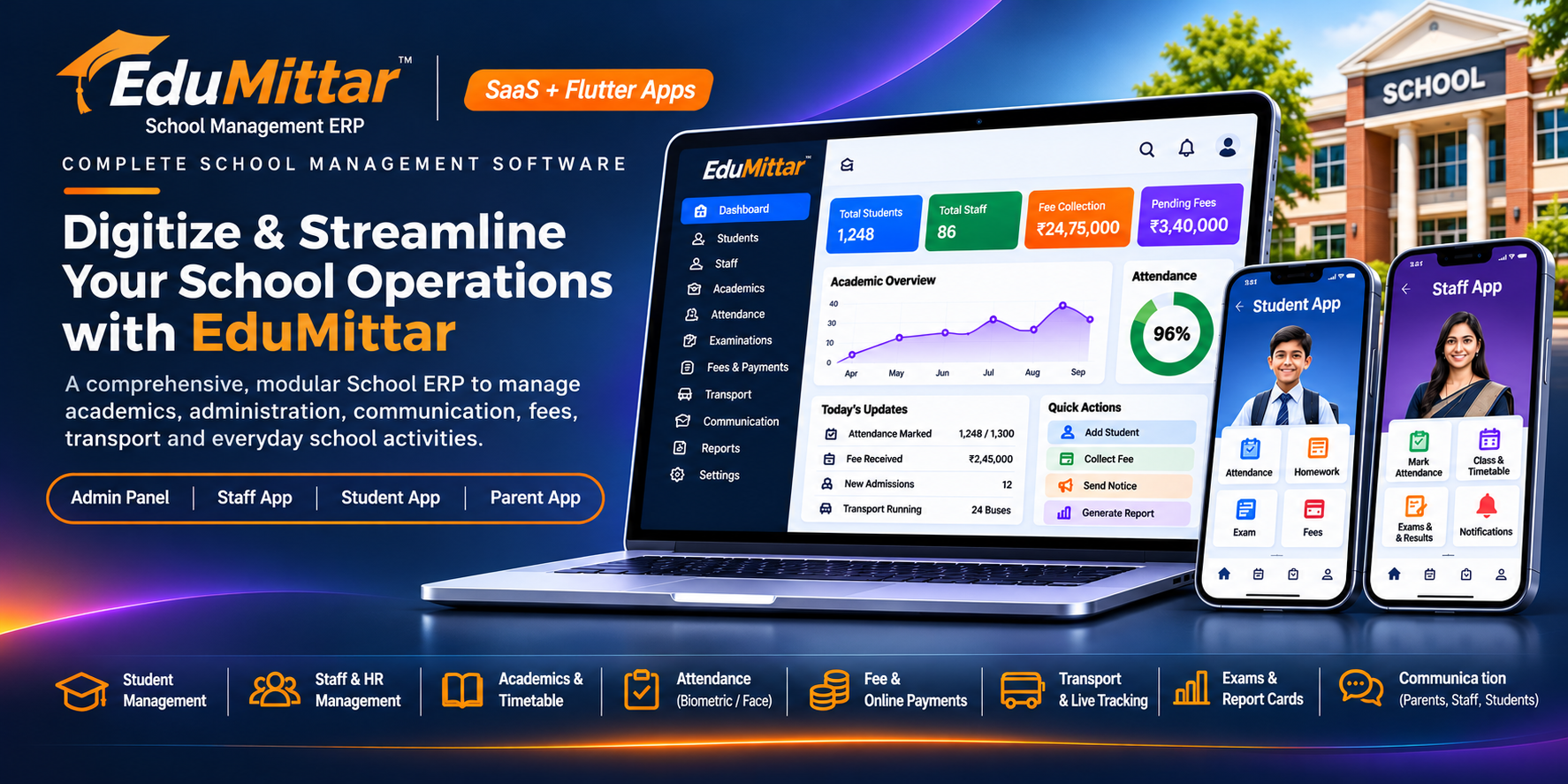
Skolvia – A Complete School ERP Platform with Multi-Branch Control, Full Backend & Dedicated Mobile Apps
Launch a complete digital school management ecosystem with Skolvia. Built for educational institutions, school groups and businesses entering the education technology market, Skolvia brings school administration, academics, finance, campus operations and role-based mobile access into one connected platform.
This is more than a student database or fee collection application. The platform is designed around the complete school operating structure: a central Superadmin panel for the SaaS/platform owner, a School panel for the institution or school group, branch-level management for individual campuses, and dedicated mobile applications for students, parents, staff, drivers and principals.
Manage admissions, student records, fees, attendance, examinations, staff, transport, accounting, canteen POS, student wallets, communication and reporting through an integrated web and mobile ecosystem. For school groups, the multi-branch structure helps bring different campuses under one organized system while maintaining branch-level operations.
A Multi-Layer School ERP Architecture Built for Single Schools and School Groups
A school group should not have to operate every campus as a disconnected system. Skolvia is structured to support platform-level administration, school-level oversight and branch-level execution, with role-based access across the connected ecosystem.
The central backend administration environment for the owner or operator of the Skolvia SaaS installation. It provides the platform-side control point for administering school accounts, platform configuration and overall service operations, according to the enabled deployment and license.
The school-level workspace for the institution's management team. It is the central operating view for school administration and, in a multi-branch setup, provides the school group with an organized way to oversee its campuses and school-wide operations.
Each branch can work within its assigned operational scope. Branch teams can manage the student, academic, fee, staff and campus information relevant to their campus, subject to the configured permissions.
Local administration and daily campus records
Separate campus operations and assigned users
Additional campuses under the same school group
Students, parents, teachers and staff, drivers and principals use dedicated app experiences to access the information and activities relevant to their role.
Four Connected Management Environments – From SaaS Owner to Campus Team
Skolvia includes the web-side administration structure required to operate the product as a school ERP solution. Each panel serves a different administrative level instead of exposing every operation to every user.
Superadmin Panel
For the owner or operator managing the SaaS platform and its school deployments.
- Central platform administration environment
- School account and tenant administration
- Platform-level configuration and oversight
- Administration of platform-side access
- Central view of the deployed school ecosystem
- A control point for supporting multiple school customers
School Management Panel
For the school owner, management team and authorized central administrators.
- Central school administration workspace
- School-wide student and staff information
- Academic, fee and examination administration
- Oversight of school and branch operations
- School-level reports and operational visibility
- Access according to assigned administrative roles
Multi-Branch / Branch Panel
For branch heads, campus administrators and branch-level operating teams.
- Branch-specific operational workspace
- Local student and parent records
- Branch academic and timetable activities
- Local fee and attendance administration
- Staff and campus information
- Branch operations within configured permissions
One School Group. Multiple Campuses. An Organized Operating Structure.
Expand from one school to a group of campuses without treating every branch as a completely separate business system. Keep the overall school structure organized, assign branch teams their working scope and maintain the ability to review school operations from the appropriate administrative level.
Everything a Modern School Needs to Manage Its Daily Operations
Bring administration, academic workflows, fee operations, transport, staff and campus services into one connected school management platform.
Admissions & Enquiry Management
Organize the student admission journey from first enquiry to enrolment, with a consistent record for the school office.
- Admission enquiry and follow-up records
- Online and offline admission entries
- Student registration and profile creation
- Class, section and roll-number allocation
- Parent and guardian details
- Document records and student ID cards
Student Information System
Maintain a structured student record across academic sessions and relevant school workflows.
- Personal and contact information
- Parent and guardian information
- Class and section details
- Student documents and ID information
- Academic and attendance records
- Student history and administrative reports
Fee & Collection Management
Configure fee structures, allocate dues and keep collection activity visible to the accounts team and authorized administrators.
- Fee masters and configurable fee heads
- Class-wise and student-wise fee allocation
- Online fee collection support
- Automatic fee receipt generation
- Scholarships, concessions and custom discounts
- Outstanding dues and collection reports
Academic & Classroom Management
Organize academic structures and everyday teaching-related information in one school system.
- Academic session and year setup
- Class, section and subject management
- Subject and teacher allocation
- Timetable management
- Homework and assignments
- Academic progress information
Attendance Management
Keep student and employee attendance records organized and accessible to authorized users.
- Daily student attendance
- Staff attendance records
- Attendance history and summaries
- Absence monitoring
- Biometric attendance integration
- Facial attendance support
Examination & Report Cards
Manage assessment schedules and student performance records from examination setup through result communication.
- Examination and assessment setup
- Online and offline examination management
- Marks entry and grade management
- Result processing
- Report card generation
- Student performance records
HR & Staff Management
Maintain employee information and support day-to-day staff administration.
- Teacher and non-teaching staff profiles
- Department and designation records
- Staff attendance
- Employee document records
- Role and responsibility allocation
- Staff-related reports
Transport & Fleet Management
Coordinate school transport information, route records, vehicles and student allocations.
- School bus and vehicle records
- Route and stop management
- Student transport allocation
- Driver and attendant information
- GPS-based bus tracking support
- Transport-related records and reporting
Student Wallet & Canteen POS
Bring selected campus transactions into the school management environment.
- Student wallet records and balances
- Canteen point-of-sale facility
- Student purchase records
- Wallet transaction history
- Canteen sales management
- Campus transaction visibility
School Accounting & Finance
Maintain school financial activity records and connect fee-related operations with financial visibility.
- Income and expense records
- Fee collection accounting
- Financial transaction records
- Accounting reports and summaries
- Tally integration
- School-level financial overview
Communication & Announcements
Keep school stakeholders informed through organized notices and role-relevant updates.
- School notices and announcements
- Parent communication
- Student-related updates
- Staff information and updates
- Important school notifications
Front Office & Administration
Support the school office with structured enquiry and administrative information.
- Admission enquiry records
- Visitor and enquiry information
- Student and parent records
- Administrative workflows
- School documentation
Reports & School Analytics
Review school activity with reports covering important academic, administrative and operational areas.
- Student strength and enrolment reports
- Attendance summaries
- Fee collection and outstanding reports
- Examination and result reports
- Staff and transport reports
- Administrative summaries
ID Cards & Documents
Keep commonly used student and school records organized for administration and identification.
- Student ID card generation
- Student document records
- Employee document management
- Student profile information
- Administrative access to relevant records
Five Role-Focused Apps for the People Who Make a School Run
Skolvia extends school services beyond the office and browser. Dedicated app experiences help each stakeholder reach the school information and activities relevant to their role.
Student Mobile Application
A student's personal school companion for academic information and day-to-day school updates.
- Student profile and school information
- Attendance records
- Class timetable
- Homework and assignments
- Examination information and results
- Fee and payment information
- School announcements
Parent Mobile Application
Help parents stay connected with their child's school activities, progress and important updates.
- Child profile and school information
- Attendance monitoring
- Fee details and payment access
- Digital fee receipts
- Homework and academic updates
- Examination results
- School notices and communication
- Bus and transport information
Teacher & Staff Mobile Application
Give teaching and non-teaching staff role-relevant access to school information and assigned activities.
- Staff profile and information
- Attendance management
- Class and timetable access
- Student-related information
- Homework and assignment activities
- Academic and examination tasks
- School notices and updates
Driver Mobile Application
A dedicated driver-facing app experience within the school transport ecosystem, designed around the driver's assigned role and relevant transport information.
- Driver-focused sign-in and access
- Relevant driver and vehicle information
- Assigned route and transport details
- Access to relevant school transport information
- Role-specific information as enabled in the deployed app
Principal Mobile Application
A principal-facing mobile experience for convenient access to school-level information and oversight while away from the office.
- Principal role-based access
- School information and overview
- Relevant student and staff information
- Academic and attendance visibility
- Fee and administrative information
- School updates and reports as permitted
Connect the Office, Classroom, Transport and Campus Services
School operations do not stop at admissions and report cards. Skolvia's additional facilities help institutions organize campus services and connect important operational records.
Transport, Routes & GPS
Maintain school transport information and connect vehicle operations with student transport records.
- Vehicle and bus records
- Routes and stop management
- Student transport allocation
- Driver and attendant details
- GPS-based bus tracking support
Biometric & Facial Attendance
Connect attendance workflows with supported attendance methods and compatible devices or services.
- Student attendance records
- Staff attendance records
- Biometric integration support
- Facial attendance support
- Attendance histories and summaries
Student Wallet & Campus Canteen
Manage student wallet information and canteen transactions as part of the campus ecosystem.
- Student wallet records
- Wallet balance information
- Canteen POS
- Student purchase records
- Transaction history and sales records
Tally & Financial Connectivity
Support school accounting operations and connect relevant financial information through the listed Tally integration.
- Income and expense records
- Fee collection accounting
- Financial transaction records
- Accounting reports
- Tally integration
School Communication
Keep important information organized and make school notices available to relevant stakeholders.
- School notices and announcements
- Parent communication
- Student updates
- Staff updates
- Important school notifications
Academic Learning Workflow
Support teachers and students through the academic information available within the ERP and role-based apps.
- Timetable and subject structure
- Homework and assignments
- Examination activities
- Marks and grading
- Results and report cards
Built for Individual Institutions, School Chains and Education Businesses
The platform can serve the school that wants to digitize its own operations as well as the technology business that wants to offer school ERP services to institutions.
Turn a Complete School ERP Script into Your Own Education Technology Offering
You do not have to build a school ERP from the ground up before approaching your first school. With the applicable extended license, eligible buyers can use the supplied platform as a foundation for their own software business, subject to the license's source-code, customization, branding and redistribution rights.
Freelance Developers
Expand beyond small websites and one-off development jobs by offering a complete school management solution to local institutions.
- Approach schools in your city and region
- Offer implementation and data setup
- Provide training and ongoing support
- Charge for approved customization work
- Build recurring service relationships
IT Agencies & Software Companies
Add an education vertical to your existing service portfolio and offer schools a wider digital transformation package.
- Cross-sell to existing website and app clients
- Offer ERP deployment and configuration
- Provide school-specific onboarding
- Bundle support and maintenance services
- Build a dedicated education software vertical
Software Resellers & Channel Partners
Offer a ready school ERP foundation to institutions that need software but do not have an internal technology team.
- Build a local school customer network
- Demonstrate the multi-panel ecosystem
- Earn from licensed deployments or subscriptions
- Offer training and first-line assistance
- Grow through referrals and renewals
SaaS Founders & Entrepreneurs
Use the platform as a starting point for an education software business instead of funding a full product build from zero.
- Create a focused school ERP proposition
- Define a school onboarding process
- Set commercial packages that fit your market
- Develop a brand and sales channel where licensed
- Expand institution by institution
One Product Can Support Several Customer Services
Your commercial model is up to your business strategy and license. Rather than relying on a one-time software sale alone, you can build an education-focused service portfolio around onboarding, implementation, training, support and ongoing school relationships.
Understand the Revenue Opportunity with a Simple School-Customer Model
Schools generally operate on academic-year cycles and need dependable software, onboarding and support. A reseller can build a customer base over time by serving institutions well and earning renewals where the chosen commercial arrangement permits.
| Example A – 5 schools | 5 × ₹25,000 = ₹1,25,000 annual gross subscription receipts |
| Example B – 10 schools | 10 × ₹25,000 = ₹2,50,000 annual gross subscription receipts |
| Example C – 20 schools | 20 × ₹25,000 = ₹5,00,000 annual gross subscription receipts |
| Example D – 40 schools | 40 × ₹25,000 = ₹10,00,000 annual gross subscription receipts |
These are hypothetical figures, not a forecast, promise or guaranteed return. Actual pricing, sales, renewal rates, taxes, staff costs, commissions, hosting, payment charges, customization effort and customer support can materially change results. In this example, ROA means return against the initial acquisition and setup investment, not the accounting ratio Return on Assets.
A Practical Path to Deploying Your School ERP Business
Use a clear implementation process so the school understands what is being configured, what information it needs to provide and how its teams will begin using the system.
Acquire the License
Select the license that matches your intended use, source-code requirements, branding and redistribution plans.
Deploy & Configure
Prepare the hosting and deployment environment, configure the school structure and review the required integrations.
Set Up the School
Configure sessions, branches, classes, users, fee structures, transport information and relevant records.
Train & Go Live
Introduce administrators, teachers, parents and other users to their relevant web or mobile app workflows.
A Complete Digital School Ecosystem – Not Just a Fee or Attendance Tool
Complete Backend Foundation
A full school ERP web environment with the core administrative structure required to operate the platform.
- Backend and web administration
- Multiple administrative levels
- School and branch operations
- Role-based user access
Multi-Branch Ready Structure
Support school groups that need central oversight alongside campus-level operations.
- School-level administration
- Branch-level operating access
- Multiple campus structure
- Permissions based on assigned roles
Five Dedicated Mobile App Roles
Bring the school ecosystem to the mobile devices of its key stakeholders.
- Student app
- Parent app
- Staff app
- Driver app
- Principal app
Wide School Operations Coverage
Cover more than student records with academic, financial and campus modules.
- Admissions and student management
- Fees and accounting
- Examination and attendance
- Transport, wallet and canteen
Technology & Integrations
Connect relevant services and devices supported by the product and deployment.
- Biometric attendance
- Facial attendance support
- GPS-based bus tracking support
- Tally integration
Commercial Flexibility
Choose a deployment and licensing path aligned with your own school or software business.
- School-use license option
- Extended / reseller license option
- Applicable source-code access
- Branding and customization subject to license
Choose the License That Matches Your Plan
Skolvia can serve an institution that wants to manage its own school as well as a software business that wants to create an offering for multiple institutions. The rights are different, so select the correct license before deployment or resale.
Standard License
For a school or educational institution that wants to use the platform for its own operational requirements, in accordance with the applicable license terms.
- Use the product for the permitted institution or deployment
- School management web panel
- Student, parent and staff workflows
- Academic, fee and attendance management
- Examination and report card facilities
- Transport and campus operations as included
- Access to the included mobile app functionality
- School reports and administration tools
Extended / Reseller License
For eligible software companies, agencies, entrepreneurs and resellers planning to customize, brand or redistribute the solution within the permitted license scope.
- Extended usage rights as defined in the license
- Source-code access as included in the selected license
- Customize and modify the application within permitted rights
- White-label branding opportunities
- Resell or redistribute as expressly permitted
- Build your own school ERP business proposition
- Offer deployment, onboarding and support services
- Develop your own school customer network
Skolvia – School ERP SaaS Product Specifications
| Product Name | Skolvia – Complete School ERP & Digital Campus Platform |
| Product Category | School Management ERP / Education Management SaaS |
| Backend | Complete backend and web administration script as supplied with the selected product license |
| Administrative Panels | Superadmin Panel, School Management Panel and Multi-Branch / Branch Panel |
| Mobile Applications | Dedicated Flutter app experiences for Students, Parents, Staff, Drivers and Principals |
| Multi-Branch | School-group structure with branch-level operations and role-based access |
| Core Modules | Admissions, Student Management, Fees, Academics, Attendance, Examinations, HR, Transport, Accounting, Communication and Reports |
| Campus Facilities | Student Wallet, Canteen POS, ID Cards and Report Cards |
| Integrations | Biometric Attendance, Facial Attendance Support, GPS-Based Transport Tracking Support and Tally Integration |
| License Options | Standard License and Extended / Reseller License |
| Customization | Subject to selected license and applicable terms |
| Source Code | Available with applicable extended licensing |
| White Label | Available under applicable extended licensing terms |
Questions Before You Purchase or Deploy Skolvia
1. What is Skolvia?
Skolvia is a school ERP and digital campus platform that brings admissions, student information, fees, academics, attendance, examinations, staff, transport, accounting and campus services into one connected system.
2. Does Skolvia support multiple branches?
Yes. Skolvia is designed to support a multi-branch school setup. A school group can operate a central school-level environment with branch-level operations and access for the respective campuses.
3. What is the difference between the Superadmin, School and Branch panels?
The Superadmin panel is for the platform owner and SaaS-level administration. The School panel supports the institution or school group. Branch-level access is intended for individual campuses to manage their permitted local operations.
4. Can the school group view all its branches?
The multi-branch structure is intended to provide school-level oversight while branches work within their assigned scope. The exact reports and permissions available should be confirmed against the deployed configuration.
5. Does the product include the complete backend script?
The product is offered as a complete school ERP solution with its backend and web administration environment. Source-code access, modification and redistribution rights depend on the license selected.
6. Which mobile applications are included?
The connected mobile ecosystem includes dedicated applications for students, parents, staff, drivers and principals, with access shaped around the relevant role and enabled features.
7. Can parents see attendance, homework and results?
Yes. The parent application provides access to child-related information such as attendance, fee details, homework, academic updates, examination results and school notices.
8. Can students access timetable and assignments?
Yes. The student application provides access to relevant academic information, including timetable, homework, assignments, attendance, fee information, results and school announcements.
9. What can teachers and staff do from the app?
The staff application supports access to staff information, attendance, class and timetable details, student-related information, homework and assignment activities, examination tasks and notices, according to assigned permissions.
10. Is there a separate driver application?
A driver-focused app is included in the mobile-app scope described for this offering. Its available screens and operational actions should be checked in the supplied build and configured role permissions before deployment.
11. Does Skolvia include a principal app?
Yes. The principal-facing app is intended to provide role-relevant access to school information and oversight. The exact dashboard widgets and actions depend on the configured permissions and app build.
12. Does it support online fee collection?
The ERP supports online fee collection, fee allocation, receipt generation, concessions and outstanding dues management. Payment gateway availability and provider charges depend on the selected deployment and integration.
13. Can the school manage biometric and facial attendance?
The source product information includes biometric attendance integration and facial attendance support. Hardware compatibility, setup and any third-party service requirements should be verified for the intended environment.
14. Can the school track buses?
The transport module supports vehicle, route, stop, driver and student transport records, with GPS-based bus tracking support. Live tracking depends on the compatible GPS device, service and configuration.
15. Does it include canteen POS and student wallet?
Yes. The supplied feature set includes student wallet management, wallet balance and transaction records, canteen POS and student purchase records.
16. Does Skolvia support Tally?
Tally integration is included in the supplied product feature list. Confirm the supported version and integration workflow for your particular deployment.
17. Can it handle online and offline examinations?
Yes. The examination module supports online and offline examination management, marks entry, grading, result processing and report card generation.
18. Can an IT agency or freelancer resell it?
The extended/reseller license is intended for eligible software businesses, agencies and entrepreneurs. White-labeling, source-code access, customization and redistribution are subject to the exact license terms.
19. Can I customize the platform for a school group?
Customization opportunities are available under applicable licensing. Scope, delivery effort, integrations and any branch-specific requirements should be agreed before implementation.
20. Is the product suitable for a school chain?
The multi-branch structure makes it relevant to school groups that need branch-level operations together with school-level oversight. Final suitability should be validated against the group's permission, reporting and operational requirements.
21. Are hosting, SMS, payment gateway and GPS costs included?
These are deployment- and provider-dependent. Hosting, messaging credits, payment gateway charges, GPS hardware/service fees, biometric devices and third-party licenses may be additional unless expressly included in the commercial offer.
22. Is revenue or return on investment guaranteed for resellers?
No. Revenue examples are illustrative only. Actual results depend on sales, pricing, onboarding, renewals, support costs, hosting, local competition and the reseller's ability to serve schools.
Bring Every Campus, Classroom and Stakeholder into One Digital Ecosystem
From a single school to a growing multi-branch institution, Skolvia brings together the web backend, school administration, branch operations and dedicated mobile app experiences required for connected school management. And for software businesses, the applicable extended license can provide a foundation to launch and grow a school ERP offering of their own.
Configuration
Customize your package to calculate the final price.