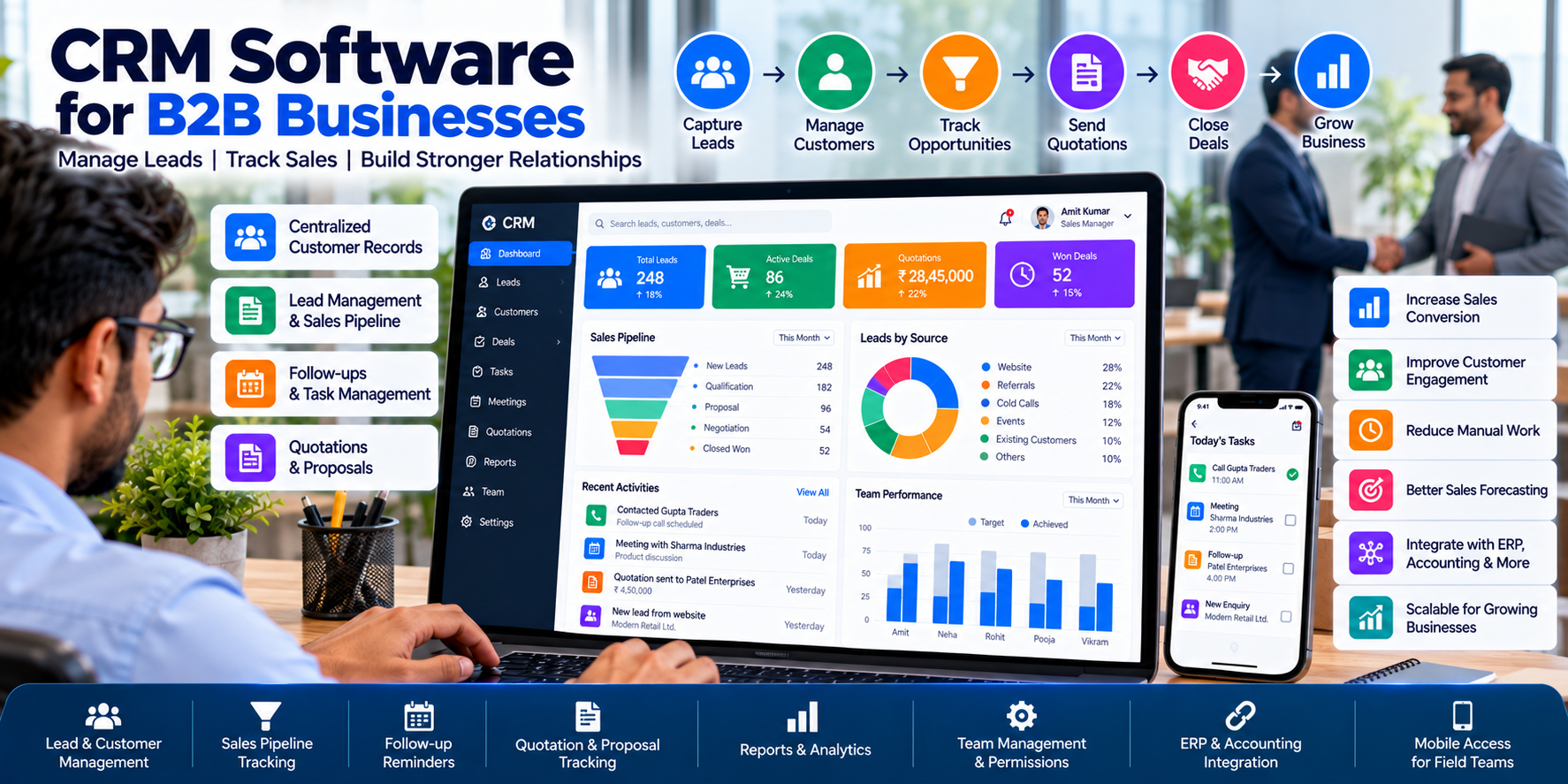
Why B2B Businesses Need CRM Software
Building strong customer relationships is essential for sustainable business growth. For B2B companies, the sales process can involve multiple meetings, product demonstrations, quotations, negotiations, approvals and follow-ups before a deal is finalized.
As a business grows, managing these activities through spreadsheets, notebooks, emails and WhatsApp conversations can become difficult. Important leads may be forgotten, customer information may become scattered, and managers may struggle to understand which opportunities are most likely to convert.
CRM software for B2B businesses helps organize customer information, sales activities and business opportunities in a centralized system. It enables teams to maintain customer records, track interactions, schedule follow-ups and monitor sales pipelines.
Depending on the system, CRM software can also connect with email, communication platforms, accounting software, ERP systems and order management applications.
At Cycode Technologies, businesses can explore custom software development and business automation solutions to support their operational requirements.
In this guide, we explain what B2B CRM software does, which features matter most, how it differs from sales force automation, and how businesses can choose a suitable CRM solution.
What Is CRM Software?
Customer Relationship Management (CRM) software is a digital system that helps businesses manage information and interactions related to leads, prospects, customers and business opportunities.
Instead of keeping customer details in separate files or individual employees' devices, a CRM system provides an organized record that authorized team members can access.
A CRM system may include:
- Lead capture and management.
- Customer and company profiles.
- Sales pipeline tracking.
- Meeting and communication history.
- Follow-up reminders and task management.
- Quotations and proposal tracking.
- Sales team assignments.
- Customer segmentation.
- Sales reports and dashboards.
- Email and messaging integrations.
- Connections with accounting, ERP and other business systems.
A simple CRM may focus on customer records and follow-ups. A more advanced platform may support multiple sales teams, automated workflows, customized reports and integrations across departments.
The right CRM depends on your business model, sales process, team size and customer management requirements.
Why B2B Companies Need a CRM System
B2B sales often require longer decision-making cycles and more interaction than a straightforward one-time purchase. Several people may be involved in evaluating a product, approving a quotation or negotiating commercial terms.
A CRM system can help businesses manage these relationships more consistently.
1. Prevent Leads From Being Forgotten
Enquiries may arrive through website forms, phone calls, social media, referrals and sales representatives.
Without a central record, a lead can be overlooked or assigned to the wrong person.
CRM software can help capture enquiries, assign ownership and create follow-up tasks so that every lead has a defined next step.
2. Maintain a Complete Customer History
Customer conversations may take place across meetings, emails, phone calls and messages.
A CRM can bring relevant interaction records together, helping sales representatives understand previous discussions and continue conversations with better context.
3. Improve Sales Team Coordination
When several representatives or departments work with the same customer, a shared CRM record can reduce duplication and confusion.
Managers can review assignments, track activity and transfer customer responsibilities when needed.
4. Make Sales Opportunities More Visible
A CRM pipeline shows where opportunities stand in the sales process.
Managers can identify deals awaiting quotations, negotiations, customer decisions or follow-up actions and prioritize work accordingly.
5. Improve Customer Retention
Maintaining customer records, purchase history and follow-up schedules can help businesses provide more consistent service to existing customers.
CRM data can also help identify customers who may need attention, subject to the quality and completeness of the available records.
Essential Features of CRM Software for B2B Businesses
The following features are worth considering when selecting or developing a CRM system.
1. Lead Management
Lead management helps businesses record, organize, assign and track prospective customers.
A lead record may include:
- Contact name and business name.
- Phone number and email address.
- Industry or customer category.
- Lead source.
- Product or service of interest.
- Assigned sales representative.
- Lead status.
- Next follow-up date.
- Notes and interaction history.
The system can help teams identify new enquiries, assign responsibilities and move qualified prospects into the sales pipeline.
For businesses receiving leads from multiple channels, integration with website forms and other supported sources can reduce manual data entry.
2. Customer and Company Management
B2B relationships often involve several contacts within the same organization.
A CRM should support company records alongside individual contacts, allowing employees to understand which people belong to which business.
Depending on the requirements, a company profile may include:
- Business name and contact details.
- Industry and company category.
- Addresses and locations.
- Key contacts and decision-makers.
- Account owner.
- Previous interactions.
- Related leads and opportunities.
- Quotations and orders, where integrated.
This structure is especially useful for manufacturers, distributors, IT service providers and other companies serving business accounts.
3. Sales Pipeline Management
A sales pipeline organizes opportunities into stages that reflect the company's sales process.
For example, a B2B sales pipeline might include:
- New lead.
- Initial contact.
- Requirement discussion.
- Qualified opportunity.
- Meeting or demonstration.
- Quotation submitted.
- Negotiation.
- Won or lost.
Each opportunity can have an owner, estimated value, expected closing date and next action.
The pipeline should reflect actual business practices. A simple service company may need only a few stages, while an enterprise sales team may require more detailed qualification and approval processes.
4. Follow-Up Reminders and Task Management
Sales opportunities frequently require multiple interactions before a decision is made.
CRM software can help representatives schedule calls, meetings, proposal reviews and other activities.
Useful capabilities include:
- Task assignments.
- Due dates and reminders.
- Priority levels.
- Meeting schedules.
- Overdue task reports.
- Recurring follow-up activities.
- Notes and next-action tracking.
Automated reminders can reduce dependence on memory, but employees still need to maintain accurate task statuses and customer records.
5. Quotation and Proposal Management
Many B2B businesses prepare quotations before receiving an order.
A CRM can record quotation details, submission dates, validity periods, follow-up activities and customer responses.
Where supported, it may connect with quotation-generation or accounting software to reduce duplicate data entry.
Businesses should define how revised quotations, special discounts, approvals and accepted proposals are handled.
6. Sales Activity Tracking
Sales managers need visibility into the activities taking place across their teams.
Depending on the configuration, a CRM may track calls, meetings, emails, demonstrations, customer visits and follow-up completion.
Activity reports help managers review whether opportunities are progressing and where additional support may be required.
Activity volume should not be treated as the only measure of success. A large number of calls or meetings does not necessarily translate into successful sales.
7. Customer Segmentation
Not every customer has the same needs, purchasing patterns or commercial value.
CRM segmentation allows businesses to group customers according to relevant characteristics, such as industry, location, customer type, product interest or engagement status.
These groups can support more relevant sales communication, account planning and customer service.
Segmentation criteria should be meaningful to the business and kept up to date.
8. Sales Dashboards and Reporting
A CRM dashboard can help business owners and managers understand the performance of their sales process.
Useful reports may include:
- New leads received.
- Leads by source.
- Lead-to-opportunity conversion.
- Opportunities by pipeline stage.
- Quotations submitted.
- Won and lost deals.
- Sales by representative.
- Follow-ups due.
- Average sales cycle duration.
- Forecast pipeline value.
Reports should use clearly defined metrics and reliable data. For example, the value of an open opportunity should not automatically be treated as confirmed revenue.
9. Customer Communication History
A customer's history may include calls, meetings, emails, quotations and other interactions.
A CRM can organize these records so authorized team members can review previous conversations before contacting the customer.
Email and messaging integrations may also be available, depending on the selected platform, API access and configuration.
Communication records should be handled according to appropriate privacy, retention and access policies.
10. Workflow Automation
CRM automation can help reduce repetitive administrative tasks.
Examples include:
- Assigning new leads to the appropriate team.
- Creating a follow-up task after a quotation is sent.
- Reminding employees about overdue activities.
- Notifying managers about opportunities requiring approval.
- Updating a lead's status after a defined action.
- Creating an internal task when a customer submits a request.
Automation rules should be tested carefully. Incorrect triggers or duplicate events can create unnecessary tasks and confusing customer records.
11. Role-Based Access and Permissions
CRM systems may contain confidential customer information, negotiated pricing and sales performance data.
Role-based access allows businesses to control what different users can view or change.
For example, a sales representative may manage assigned leads, while a manager can view team-level reports and an administrator can configure system settings.
Sensitive actions should have appropriate permissions and audit records.
12. Mobile-Friendly Access
Sales representatives may need to access customer records while visiting a client, attending a meeting or working away from the office.
A responsive web application or dedicated mobile app can help employees review customer information, record meeting outcomes and manage follow-ups.
If offline operation is a requirement, it should be explicitly included in the scope and tested for the relevant workflows.
B2B CRM vs. Sales Force Automation vs. ERP
CRM, sales force automation and ERP software often work together, but each serves a different primary purpose.
| System | Primary Purpose | Typical Functions |
|---|---|---|
| CRM | Manage customer relationships and sales opportunities | Leads, contacts, customer history, pipeline, follow-ups |
| Sales Force Automation | Organize sales activities and representative workflows | Visit planning, activity tracking, targets, field reporting |
| ERP | Connect business operations | Inventory, purchasing, accounting, orders, HR and other modules |
A business may use one platform that combines several of these capabilities or integrate separate systems.
For example, a distributor might use CRM to manage enquiries and customer relationships, sales force automation to coordinate field representatives, and ERP software to process orders, inventory and accounting transactions.
The best architecture depends on the business's size, existing systems and operational complexity.
How CRM Software Helps Different B2B Industries
IT Companies and Software Service Providers
IT companies may use CRM to track website development enquiries, software projects, service proposals, client meetings and contract renewals.
A CRM can help organize prospects from initial enquiry through qualification, quotation and agreement.
Manufacturers
Manufacturers can use CRM to manage distributors, prospective buyers, product enquiries, quotations and long-term business relationships.
Wholesalers and Distributors
A CRM can organize dealer information, sales opportunities, customer interactions and follow-up schedules. When connected to order management software, it can also provide relevant order history.
Educational Service Providers
Businesses selling educational software or institutional services may use CRM to track school enquiries, product demonstrations, proposals and onboarding discussions.
Real Estate Businesses
Real estate teams may need to manage enquiries, site visits, property preferences and follow-ups. A CRM can help structure the sales process, although specialized property management functions may require additional software.
Professional and B2B Service Firms
Consulting firms, agencies and service providers can use CRM to manage prospects, proposals, meetings and recurring customer relationships.
CRM Integration With ERP, Accounting and Communication Systems
A CRM becomes more valuable when relevant information can move between systems without unnecessary duplication.
CRM and ERP Integration
CRM can manage customer enquiries and opportunities, while ERP handles operational transactions such as confirmed orders, inventory and other business processes.
An integration can transfer approved information between the systems, subject to available APIs and the agreed workflow.
CRM and Accounting Integration
Accounting integration may allow authorized users to access relevant invoice, payment or outstanding-balance information from connected financial records.
The integration should respect accounting controls and clearly define which system is responsible for maintaining each record.
CRM and Website Integration
Website forms can send enquiries into a CRM, allowing the business to assign leads and schedule follow-ups.
The integration should validate incoming data and prevent duplicate submissions where practical.
CRM and WhatsApp Integration
Where supported by the relevant messaging APIs and permissions, businesses may connect communication workflows to their CRM.
Possible uses include approved customer notifications, enquiry routing, follow-up workflows and conversation records.
Automated communication should comply with applicable platform policies and customer consent requirements.
CRM and E-Commerce Integration
For businesses selling online, CRM may connect customer records with relevant order and purchase history.
This can help sales teams understand existing customer relationships, provided the integration is designed with appropriate access controls and data handling rules.
Custom CRM Software vs. Ready-Made CRM
Choosing between custom development and a ready-made platform depends on the business's requirements, budget and existing technology.
When Ready-Made CRM May Be Suitable
A ready-made CRM may work well when the business has standard requirements for leads, contacts, pipelines, tasks and reports.
Potential advantages include quicker setup and access to established features, although subscription fees, user limits and customization restrictions should be reviewed.
When Custom CRM Development May Make Sense
Custom CRM development may be worth considering when a business needs:
- Industry-specific sales workflows.
- Custom approval processes.
- Unique customer or account structures.
- Specialized reporting and dashboards.
- Integration with existing ERP or accounting systems.
- Custom dealer or partner portals.
- Tailored mobile applications.
- Business-specific automation rules.
Custom development can align the system with existing processes, but it requires careful planning, testing, maintenance and ongoing support.
A Practical Decision Framework
Before deciding, list your essential CRM requirements and compare them against available products.
Consider the total cost, implementation time, integration needs, data migration, user training, security controls and future scalability.
Avoid building a custom system solely because a ready-made platform has a different interface. Custom development is most valuable when it solves real workflow or integration problems.
How Much Does CRM Software Cost in India?
CRM software costs vary according to the features, number of users, deployment model and level of customization.
Common cost factors include:
- Number of users and teams.
- Lead and customer management requirements.
- Sales pipeline and approval workflows.
- Mobile application requirements.
- Communication and notification integrations.
- ERP, accounting and e-commerce integration.
- Custom dashboards and reports.
- Data migration and training.
- Hosting, security, maintenance and technical support.
A small business may need a basic CRM for leads and follow-ups, while a larger B2B company may require custom workflows, multiple teams, integration and advanced reporting.
When comparing proposals, ask for a clear breakdown of licensing or development, implementation, customization, integrations, hosting and ongoing support.
How to Implement CRM Software Successfully
A successful CRM implementation requires more than installing software. The system must reflect the business's actual sales process and be adopted by its users.
Step 1: Review Your Existing Sales Process
Document how enquiries arrive, who qualifies them, how quotations are prepared and how follow-ups are handled.
Step 2: Define Your Objectives
Identify the main problems you want to solve, such as missed leads, inconsistent follow-ups, limited reporting or scattered customer information.
Step 3: Choose the Required Features
Prioritize the features that support those objectives. Start with essential capabilities rather than introducing every possible module at once.
Step 4: Clean and Organize Customer Data
Review existing spreadsheets and customer records before importing them. Remove duplicates where appropriate and standardize key fields.
Step 5: Configure Roles and Workflows
Define user permissions, lead assignments, pipeline stages, required fields and approval rules.
Step 6: Integrate Relevant Systems
Connect the CRM to other systems where the integration provides a clear benefit. Establish data ownership and error-handling rules before relying on automated updates.
Step 7: Train the Team
Explain how to create records, update opportunities, schedule tasks and use reports. Make sure employees understand how the CRM supports their daily work.
Step 8: Measure Adoption and Results
Monitor data completeness, overdue follow-ups, pipeline accuracy and the time spent preparing reports. Gather feedback and improve the workflow as needed.
Common CRM Implementation Mistakes to Avoid
1. Treating CRM as only a contact database. A useful CRM should support the sales process, not merely store phone numbers.
2. Adding too many fields. Excessive data entry can discourage employees from updating records.
3. Using unclear pipeline stages. Every stage should have a defined meaning and clear criteria for moving an opportunity forward.
4. Migrating poor-quality data. Duplicate or outdated records can undermine trust in the new system.
5. Ignoring user adoption. Training, clear ownership and simple workflows are essential.
6. Automating before defining processes. Unclear rules can produce duplicate tasks, incorrect assignments or confusing notifications.
7. Ignoring permissions and security. Customer data and commercial information need suitable protection.
8. Measuring the wrong outcomes. More CRM activity does not automatically mean more revenue. Track meaningful business indicators and interpret them in context.
CRM Software Development and Business Automation With Cycode Technologies
Businesses differ in how they generate leads, manage customer relationships and convert opportunities into sales.
Cycode Technologies provides software development and digital business solutions that can be explored for CRM-related requirements, including:
- Custom CRM software development.
- Lead and customer management systems.
- Sales pipeline and follow-up workflows.
- Sales dashboards and reporting.
- Dealer and partner portals.
- CRM and ERP integration.
- Accounting and order management integration.
- Mobile application development.
- Business workflow automation.
The appropriate solution depends on your business process, existing applications and required functionality.
For some companies, a ready-made CRM may be sufficient. Others may benefit from a custom application or integration that connects customer management with their existing business systems.
The first step is to document the current workflow and identify the specific problems the software needs to solve.
Supporting Businesses Across India and International Markets
CRM and business software can help organizations coordinate customer relationships across different locations and teams.
Cycode Technologies can discuss software development and digital business requirements for companies in Hansi, Hisar, Bhiwani, Bikaner, Tinsukia, Bengaluru and other locations across PAN India. Businesses operating in international markets, including Namibia, Nigeria and the USA, can also discuss their project requirements.
The suitable implementation will depend on the sales process, integration needs, data handling requirements and applicable regulations in each market.
Conclusion
CRM software helps B2B businesses organize leads, manage customer relationships, track sales opportunities and create a more consistent follow-up process.
The most useful CRM is not necessarily the one with the largest feature list. It is the one that fits your sales workflow, gives employees the information they need and helps management make better decisions.
Start by identifying where your business loses leads, spends too much time on manual follow-ups or struggles to understand its sales pipeline. Then choose a system that addresses those problems and can evolve as the business grows.
Looking for CRM software or custom business automation? Contact Cycode Technologies to discuss your requirements for lead management, sales workflows, CRM development, ERP integration and reporting solutions.
Frequently Asked Questions (FAQs)
1. What is CRM software for B2B businesses?
B2B CRM software helps companies manage business contacts, leads, sales opportunities, customer interactions, quotations and follow-up activities in a centralized system.
2. What are the most important features of a B2B CRM?
Common essential features include lead management, company and contact records, sales pipelines, follow-up reminders, quotation tracking, reporting and user permissions.
3. Is CRM software useful for small businesses?
Yes. Small businesses can use CRM to organize enquiries, assign leads, track follow-ups and maintain customer history. The system should match the business's needs and budget.
4. What is the difference between CRM and ERP software?
CRM focuses primarily on customer relationships and sales opportunities. ERP connects broader business operations such as accounting, purchasing, inventory, orders and other modules.
5. Can CRM software integrate with accounting software?
Yes, when suitable integration options are available. The connection may provide access to relevant invoice and payment information, depending on the systems and configured workflow.
6. Can a CRM automatically capture website enquiries?
Yes. Website forms can be connected to a CRM to create lead records and trigger assignment or follow-up workflows, provided the integration is properly configured.
7. Can CRM software integrate with WhatsApp?
Integration may be possible through supported APIs and approved workflows. Available functionality depends on the messaging platform, account setup, permissions and implementation.
8. Should a business choose custom CRM or ready-made CRM?
Ready-made CRM is often suitable for standard sales processes. Custom CRM may be appropriate when a business has specialized workflows, unique integrations or requirements that existing products cannot meet effectively.
9. How long does CRM implementation take?
The timeline depends on the number of users, data quality, customization, integrations and training requirements. A clearly defined initial scope helps establish a realistic timeline.
10. Can Cycode Technologies develop custom CRM software?
Cycode Technologies provides software development and business technology services and can discuss custom CRM requirements, including lead management, sales workflows, reporting and integration with other business systems.