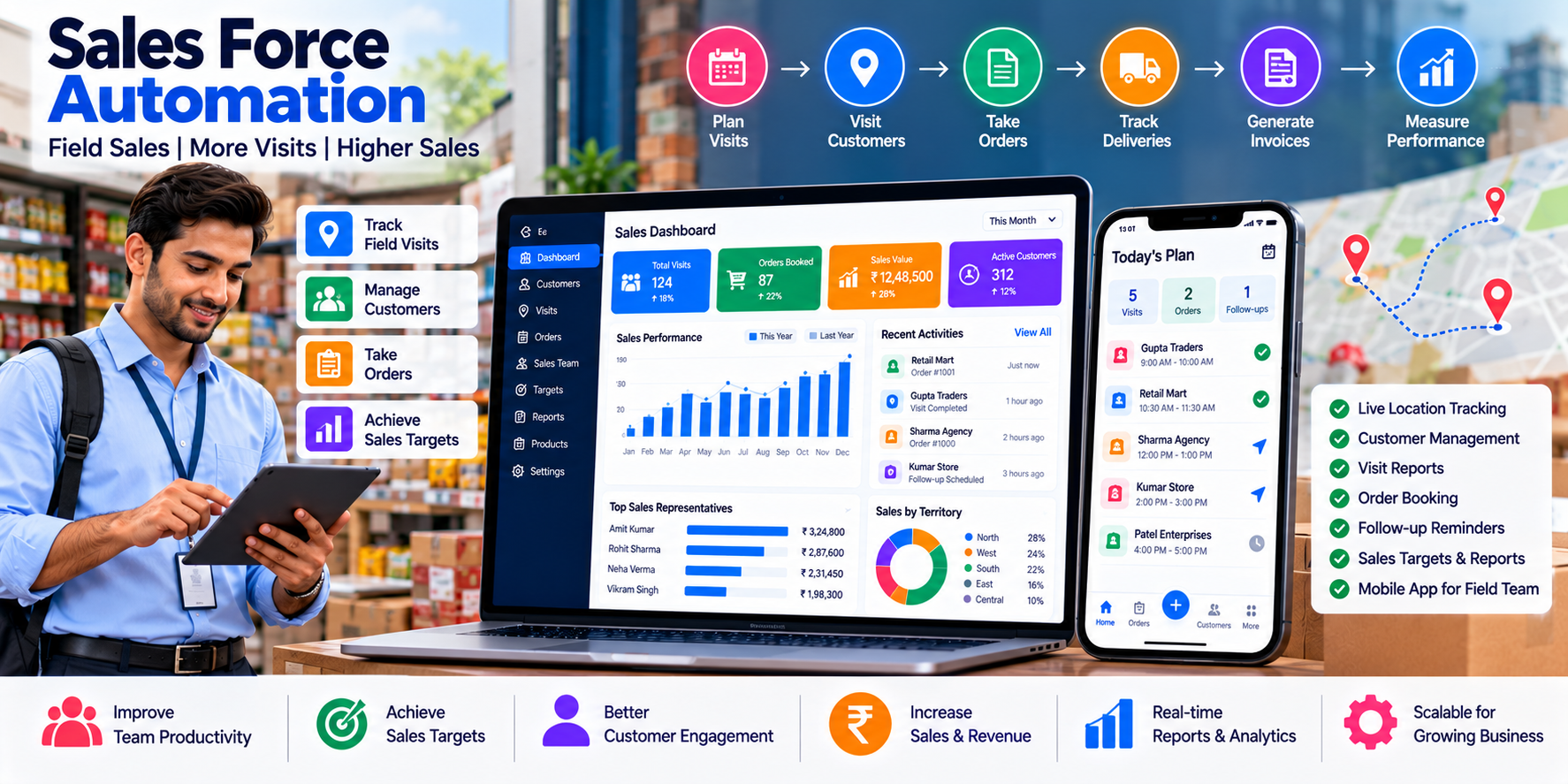
Make Your Sales Team More Productive With Automation
Sales teams are essential to business growth, but managing a sales team can become complicated as the number of employees, customers and territories increases.
Field sales representatives may visit dealers, meet prospective customers, demonstrate products, collect orders and follow up on enquiries. Meanwhile, managers need to monitor daily activities, review sales targets, understand customer demand and identify opportunities for improvement.
When this information is recorded in notebooks, spreadsheets or scattered messaging conversations, managers may struggle to get a reliable picture of sales activity. Representatives may also spend too much time preparing reports instead of interacting with customers.
Sales force automation software helps businesses organize sales activities through a centralized digital system. It can support customer management, field visits, follow-up reminders, sales targets, territory assignments and performance reporting.
For businesses that need more tailored workflows, custom software can connect sales activities with customer records, order management, inventory, accounting and other business systems.
Cycode Technologies provides software development, ERP and business automation solutions for organizations looking to streamline their operations. This guide explains how sales force automation works, which features matter most and how to select a solution suited to your business.
What Is Sales Force Automation Software?
Sales force automation (SFA) software is a digital system designed to help businesses plan, record and monitor sales activities.
It reduces repetitive administrative work by organizing tasks that sales representatives and managers perform regularly.
Depending on the system, sales force automation can include:
- Sales representative and employee management.
- Customer and prospect records.
- Daily sales plans and visit scheduling.
- Field visit records.
- Follow-up reminders and task management.
- Sales targets and achievement tracking.
- Territory and customer assignment.
- Sales opportunity tracking.
- Order booking and customer purchase history.
- Performance reports and dashboards.
- Integration with CRM, ERP and accounting systems.
A sales force automation system may be a standalone application, a module within a CRM platform or part of a broader ERP solution.
The most appropriate option depends on whether your primary requirement is managing field activities, tracking sales opportunities, coordinating a dealer network or connecting the entire sales process.
Sales Force Automation vs. CRM: What Is the Difference?
Sales force automation and customer relationship management are closely related, but they are not exactly the same.
Sales force automation focuses on organizing and streamlining sales activities, such as visits, tasks, targets, order booking and performance reporting.
Customer relationship management (CRM) focuses more broadly on customer information, communication history, leads, opportunities, relationships and customer engagement.
| Business Requirement | Sales Force Automation | CRM |
|---|---|---|
| Plan sales visits | Core capability in field-focused systems | May be available |
| Track representative activity | Common capability | May be available |
| Monitor sales targets | Common capability | Often available |
| Manage leads and opportunities | May be included | Core capability |
| Maintain customer records | Usually supported | Core capability |
| Record field visit outcomes | Common capability | May be available |
| Manage customer communication history | Depends on the system | Common capability |
| Track sales performance | Common capability | Often available |
| Automate customer service workflows | Not always included | May be supported |
Many businesses benefit from combining both approaches. The important thing is to select software that matches your sales process rather than choosing modules based only on their names.
Who Needs Sales Force Automation Software?
Sales force automation is particularly useful for businesses where employees regularly interact with customers outside a central office or manage a large portfolio of accounts.
1. FMCG Companies and Distributors
Sales representatives may visit retailers, record demand, check product availability and identify new outlets. A digital system can organize visit plans and sales activity records.
2. Manufacturers
Manufacturers with regional sales teams can manage customer assignments, sales opportunities, meetings and target achievement through a centralized platform.
3. Pharmaceutical and Healthcare Sales Teams
Field representatives may need structured visit planning, account records and activity reporting. Any solution for regulated industries should be assessed against applicable requirements and organizational policies.
4. Agriculture and Agricultural Supply Businesses
Businesses supplying agricultural inputs, equipment and related products may manage customers across large territories. Sales activity tracking can help coordinate visits and seasonal campaigns.
5. Wholesale and Distribution Businesses
Businesses with dealer networks can use sales force automation to organize customer visits, follow-ups, order opportunities and representative performance.
6. Real Estate Sales Teams
Property sales teams may need to track enquiries, site visits, customer meetings and follow-up activities. A CRM-integrated solution may be more suitable when lead nurturing is the primary requirement.
7. B2B Service Companies
IT companies, equipment suppliers, consulting firms and other B2B businesses can use sales automation to track meetings, proposals, follow-ups and opportunities across their teams.
Essential Features of Sales Force Automation Software
The features below are common requirements to consider when evaluating or developing an SFA system.
1. Sales Representative Management
A centralized employee directory helps managers organize the sales team.
Useful information may include:
- Employee profile and contact details.
- Assigned manager.
- Team or department.
- Assigned territory.
- Sales targets.
- Active customer assignments.
- Role and access permissions.
This structure helps businesses define responsibilities and understand which representatives manage specific customers or regions.
2. Daily Sales Planning
Sales representatives often need to organize their work around customer visits, meetings and follow-up tasks.
A sales planning module can help employees prepare a daily or weekly schedule, record planned activities and review outstanding tasks.
Managers may be able to monitor planned versus completed activities, depending on the configured system.
A good planning workflow should remain flexible enough to accommodate urgent customer requests and changes during the day.
3. Customer and Prospect Management
Sales representatives need access to accurate customer information before contacting a business.
A customer record may include:
- Business or contact name.
- Contact details.
- Business category.
- Assigned representative.
- Territory or region.
- Previous interactions.
- Follow-up tasks.
- Sales opportunities.
- Relevant order history, where integrated.
Centralized records help prevent information from being lost when an employee changes roles or a customer is reassigned.
4. Field Visit Management
Field visits are an important part of many sales operations.
A visit management module can allow representatives to record a customer meeting, the purpose of the visit, discussion outcomes and the next required action.
Depending on the business, visit records may include:
- Customer visited.
- Visit date and time.
- Meeting outcome.
- Products discussed.
- Customer requirements.
- Follow-up date.
- Notes and supporting documents.
Location-based check-ins may also be considered when there is a clear operational need. Businesses should define suitable permissions, data retention policies and employee privacy safeguards.
5. Follow-Up Reminders and Task Management
A sales opportunity can be lost when an important follow-up is forgotten.
A task management system can help representatives schedule callbacks, meetings, proposal reviews and other customer activities.
Useful features include due dates, priority levels, reminders, task status and escalation rules for overdue activities.
For example, after a customer meeting, a representative can create a follow-up task for the next week and record the action required.
This creates a more consistent process than relying entirely on memory.
6. Sales Target Management
Businesses often assign targets by employee, team, territory, product category or time period.
A sales force automation dashboard can compare recorded sales with configured targets.
It may show:
- Monthly or quarterly targets.
- Actual sales.
- Target achievement percentage.
- Remaining target.
- Sales by product.
- Sales by territory.
- Team-level performance.
The system should clearly define what counts towards a target—for example, booked orders, invoiced sales or completed transactions—so reports remain consistent.
7. Territory and Customer Assignment
When a company operates across multiple regions, it needs a clear process for assigning customers and responsibilities.
Territory management can help organize customers by location, sales area, business segment or another defined classification.
Managers can review territory-wise performance and identify areas where additional sales activity may be useful.
Territory rules should also address duplicate customer ownership, account transfers and temporary reassignment.
8. Sales Opportunity Tracking
For businesses with longer sales cycles, it is important to understand the status of each opportunity.
A system may track stages such as:
- New enquiry.
- Initial contact.
- Customer requirement identified.
- Product demonstration or meeting.
- Quotation or proposal shared.
- Negotiation.
- Won or lost.
These stages should reflect the actual sales process. A simple field sales operation may need only a few stages, while a complex B2B sales organization may need more detailed workflows.
9. Order Booking and Sales Records
Some sales teams take orders directly during customer visits.
A sales application can allow authorized representatives to record product quantities, requested delivery details and customer requirements.
Where connected to a suitable order management or ERP system, the order can move through validation, approval and fulfilment workflows.
The software should distinguish between a submitted order, an approved order and a completed sale. This prevents activity reports from overstating actual revenue.
10. Sales Performance Dashboards
Managers need a reliable way to understand how the sales team is performing.
A dashboard may display:
- Sales by representative.
- Sales by territory.
- Target achievement.
- Completed customer visits.
- Pending follow-ups.
- New customers acquired.
- Opportunities won and lost.
- Orders booked.
- Sales trends over time.
The value of a dashboard depends on the quality of the underlying data and clear definitions of each metric.
11. Mobile Access for Field Representatives
Sales representatives may work in customer offices, shops, warehouses or remote areas. Mobile-friendly access can help them record activities without returning to the office.
Depending on the implementation, the application may support customer records, visit notes, task reminders, product information and order booking.
If offline functionality is required, it must be explicitly designed and tested for the necessary workflows, including how changes are stored and reconciled when connectivity returns.
12. Integration With CRM, ERP and Accounting
Sales force automation becomes more powerful when it connects to other business systems.
Potential integrations include:
- CRM for customer and lead records.
- ERP for orders and business processes.
- Inventory systems for product availability.
- Accounting software for invoices and payment records.
- Communication platforms for supported notifications.
- Reporting tools for management analytics.
Before development, define which system is the source of truth for customer details, prices, orders and financial records. This helps avoid conflicting data across applications.
Benefits of Sales Force Automation for Businesses
Improved Sales Team Productivity
By reducing manual reporting and organizing follow-ups, representatives can spend more time on customer interactions and sales opportunities.
Better Management Visibility
Managers can review sales activities and performance through centralized reports rather than waiting for manually prepared updates.
More Consistent Follow-Ups
Task reminders and overdue activity reports help teams track commitments and reduce the likelihood of forgotten customer interactions.
Stronger Customer Relationships
When representatives can review relevant customer history and record meeting outcomes, conversations can become more informed and consistent.
Clearer Accountability
Assigned customers, defined targets and recorded activities help establish responsibilities across the team.
More Informed Sales Planning
Historical sales data can help management identify trends, compare territories and review the performance of different products or customer segments.
Easier Team Handover
When customer information and follow-up history are stored centrally, another representative can continue the relationship when responsibilities change.
These benefits are not automatic. They depend on appropriate workflows, reliable data, user adoption and effective management practices.
How to Measure the Success of Sales Automation
Installing software is only the first step. Businesses should define the outcomes they want to improve and measure them consistently.
Consider tracking these indicators:
| KPI | What It Measures |
|---|---|
| Sales target achievement | Actual sales compared with defined targets |
| Visit completion rate | Completed visits compared with planned visits |
| Follow-up completion | Tasks completed by their due dates |
| Conversion rate | Opportunities converted into the defined successful outcome |
| New customer acquisition | New customers meeting the company's criteria |
| Average order value | Average value of qualifying orders |
| Sales cycle duration | Time taken to move an opportunity from the defined start to end point |
| Reporting time | Time spent preparing routine sales reports |
| Repeat purchase rate | Share of customers who purchase again within a defined period |
Choose a small number of meaningful KPIs rather than overwhelming the team with dozens of metrics.
Targets should reflect the business model, territory potential and sales cycle. A high number of visits alone does not necessarily mean better sales performance.
Sales Force Automation vs. Manual Sales Tracking
| Requirement | Manual Tracking | Sales Force Automation |
|---|---|---|
| Customer records | May be scattered across files | Centralized records |
| Daily sales plans | Paper or spreadsheet based | Digital scheduling and task tracking |
| Visit reports | Often submitted manually | Structured activity records |
| Follow-up reminders | Dependent on individuals | Configured tasks and reminders |
| Sales targets | Separate calculations may be needed | Target dashboards can be available |
| Team reporting | Time-consuming compilation | Centralized reports |
| Customer handover | Information may be incomplete | Shared activity history |
| Integration | Often manual | Can connect with other business systems |
Manual tracking can still work for a small team with a simple sales process. A dedicated system becomes more valuable when activity volume, reporting demands and coordination requirements increase.
How to Choose the Right Sales Force Automation Software
Step 1: Identify Your Sales Process
Document how representatives acquire customers, conduct visits, submit reports, follow up and close sales.
Step 2: Define the Main Problem
Determine whether your biggest challenge is visit management, customer records, target tracking, opportunity management or reporting.
Step 3: Assess Your Team Structure
Consider the number of representatives, managers, territories, customer accounts and user roles.
Step 4: Evaluate Mobile Usability
Test the tasks that employees will perform most frequently in the field. Avoid workflows that require too many steps for simple activities.
Step 5: Review Reports and Permissions
Confirm that managers receive useful information and that employees only access the records appropriate to their roles.
Step 6: Check Integration Requirements
Determine whether sales activities need to connect with CRM, ERP, accounting, order management or communication platforms.
Step 7: Plan Training and Adoption
Introduce the system with clear procedures and practical training. Explain how the data will be used and why accurate records matter.
Step 8: Launch in Stages
Start with essential functions, gather feedback from representatives and managers, then improve the workflow before adding more complex modules.
How Much Does Sales Force Automation Software Cost in India?
The cost of sales force automation depends on the scope of the system and the complexity of the business workflow.
Important cost factors include:
- Number of users and managers.
- Web dashboard and mobile application requirements.
- Customer and territory management.
- Visit scheduling and reporting.
- Target management and analytics.
- CRM, ERP and accounting integrations.
- Location-based features, if required.
- Data migration and training.
- Hosting, security, maintenance and support.
- Custom workflows and approval requirements.
A business that needs a simple sales activity tracker will have different requirements from a company managing a large field sales team with integrated ordering and financial reporting.
When evaluating a solution, compare the total cost of ownership—not just the initial development or subscription price. Confirm which features, integrations, updates and support services are included.
Common Mistakes to Avoid
- Tracking activity without defining outcomes: Recording visits is useful, but businesses should also understand whether those visits generate meaningful opportunities and sales.
- Adding too many mandatory fields: Excessive data entry can discourage employees from using the system consistently.
- Ignoring the needs of field representatives: The interface should be practical for people working outside the office.
- Using unclear performance metrics: Define sales, conversion, visit completion and target achievement consistently.
- Failing to maintain customer data: Duplicate or outdated customer records reduce the value of reports.
- Ignoring employee privacy: Location tracking and other monitoring features should have a legitimate purpose, clear policies and appropriate access controls.
- Automating without training: Employees need to understand the workflow and how the system supports their work.
- Ignoring integration quality: Test data mapping, failed requests, duplicate records and reconciliation before relying on connected systems.
Custom Sales Force Automation Software by Cycode Technologies
Every business has its own sales structure. A distributor with a large dealer network may need different tools from a manufacturer managing regional representatives or a B2B company selling high-value services.
Cycode Technologies provides software development and business technology solutions that can be explored for sales and operational requirements, including:
- Custom sales management software.
- Field sales activity tracking.
- Customer and territory management.
- Sales dashboards and reporting.
- CRM and ERP-related development.
- Order management integration.
- Mobile application development.
- API and third-party integrations.
- Workflow automation.
The right approach depends on the company's existing software, sales process, reporting requirements and budget. A custom system should be scoped around real operational needs rather than adding features that employees will rarely use.
Supporting Businesses Across India and International Markets
Sales teams increasingly work across multiple regions, and digital systems can help businesses maintain consistent processes across locations.
Cycode Technologies can discuss software development and business automation requirements for organizations in Hansi, Hisar, Bhiwani, Bikaner, Tinsukia, Bengaluru and other locations across PAN India. Businesses operating in international markets, including Namibia, Nigeria and the USA, can also discuss their project requirements.
The appropriate solution will depend on the business model, team structure, data requirements and applicable regulations in each market.
Conclusion
Sales force automation software helps businesses organize sales activities, coordinate field representatives, manage customer follow-ups and improve visibility into sales performance.
The greatest value comes from simplifying everyday work while giving managers reliable information for decision-making.
Before choosing a system, identify your most important sales challenges, define the KPIs you want to improve and evaluate the workflows your team uses every day. Start with essential features and expand the system as your needs grow.
Looking for sales force automation or custom sales management software? Contact Cycode Technologies to discuss your requirements for field sales, customer management, reporting, ERP integration and business automation.
Frequently Asked Questions (FAQs)
1. What is sales force automation software?
Sales force automation software helps businesses manage sales activities such as customer visits, follow-up tasks, sales targets, order booking and performance reporting.
2. What is the difference between sales force automation and CRM?
Sales force automation focuses on organizing sales activities and workflows. CRM focuses more broadly on customer relationships, leads, opportunities and communication history. Many platforms combine both.
3. Can sales force automation software track field visits?
Many systems support planned visits and visit records. Location-based check-ins may also be available when supported by the implementation and appropriate organizational policies.
4. Can sales managers monitor individual and team targets?
Yes. A system can compare recorded sales with defined targets and display individual, team or territory performance, depending on its reporting capabilities.
5. Is sales force automation suitable for small businesses?
Yes. Small businesses can start with basic customer records, task reminders and sales reporting, then add more advanced features as the team grows.
6. Can sales force automation connect with ERP software?
It can, when suitable APIs or integration methods are available. The connection can help align sales activities with orders, inventory and other business processes.
7. Does sales force automation require a mobile application?
Not necessarily. A mobile-friendly web application may be sufficient for some teams. A dedicated app may be appropriate when the workflow requires specific device capabilities or a more tailored experience.
8. Can the software help improve sales performance?
It can improve visibility into sales activity, support consistent follow-ups and reduce administrative work. Actual performance improvements depend on the sales strategy, data quality, employee adoption and management practices.
9. How long does it take to implement sales force automation software?
The timeline depends on the required features, integrations, data migration and customization. Defining a clear first release helps establish a realistic implementation plan.
10. Can Cycode Technologies develop custom sales force automation software?
Cycode Technologies provides software development and business technology services and can discuss the requirements for custom sales management, field sales, reporting and related business integrations.