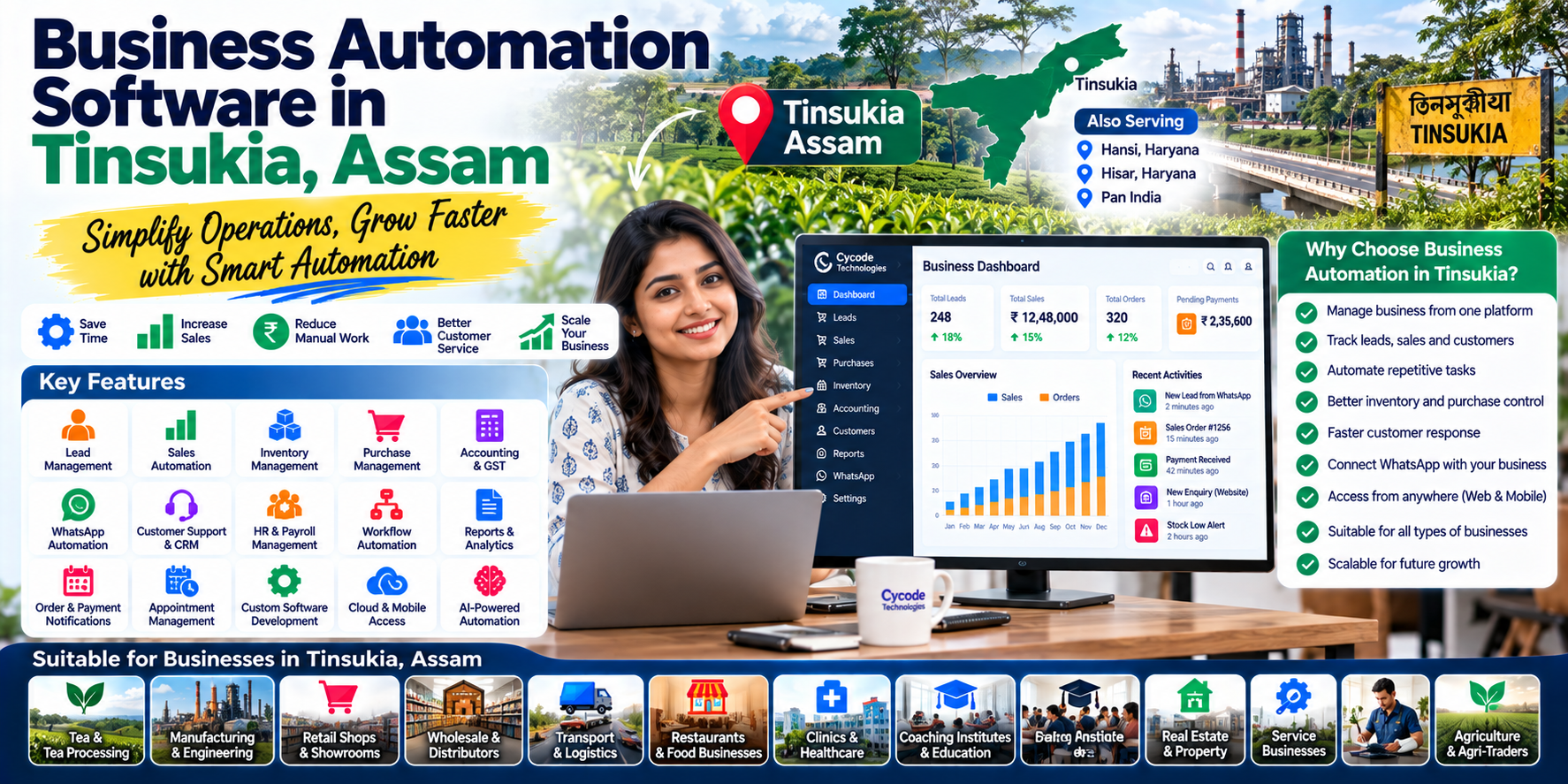
Business Automation Software in Tinsukia, Assam: Complete Guide for Growing Businesses
Running a business today involves much more than selling a product or providing a service.
A business owner may need to manage:
- Customers
- Sales
- Purchases
- Inventory
- Employees
- Accounting
- Payments
- Orders
- Leads
- Follow-ups
- Documents
- Reports
- Marketing
- Customer support
When these activities are handled manually or through multiple disconnected applications, businesses can lose time and important information.
This is where business automation software can help.
For businesses in Tinsukia, Assam, automation can help connect everyday operations into a more organized digital workflow.
Tinsukia is not limited to one type of business. The district has industrial infrastructure and businesses covering manufacturing, engineering, food products, packaging, steel, bamboo products, furniture, pharmaceuticals, spice processing and other activities.
The district also has a strong connection with tea, oil, coal and commercial activity, making software solutions relevant across multiple business categories.
What Is Business Automation Software?
Business automation software is a digital system that helps businesses automate repetitive processes and connect different areas of their operations.
Instead of employees manually moving information from one system to another, software can connect workflows.
For example:
Customer Enquiry
↓
Lead Created
↓
Salesperson Assigned
↓
Quotation Generated
↓
Order Confirmed
↓
Inventory Updated
↓
Invoice Generated
↓
Payment Recorded
↓
Customer Follow-Up
A connected system can reduce unnecessary manual data entry and make information easier to track.
Why Businesses in Tinsukia Need Business Automation
Tinsukia has businesses ranging from local retailers and distributors to manufacturing, tea-related businesses, service providers and industrial enterprises.
Different businesses have different operational requirements.
A retailer may need:
Sales + Inventory + Accounting
A distributor may need:
Purchase + Inventory + Sales + Receivables
A manufacturer may need:
Raw Material + Production + Inventory + Sales + Accounts
A service business may need:
Leads + Customers + Employees + Projects + Billing
A transport business may need:
Vehicles + Drivers + Trips + Expenses + Billing
Instead of forcing every business into the same workflow, modern business software can be designed around the organization's actual processes.
10 Business Processes You Can Automate
1. Lead Management
When customers enquire through:
- Website
- Phone
- Online forms
the information can be captured into a centralized lead-management system.
A sales team can then see:
- New leads
- Assigned salesperson
- Lead source
- Customer requirement
- Follow-up date
- Lead status
- Conversion status
This reduces the possibility of losing valuable enquiries.
2. Sales Automation
Sales teams often spend significant time preparing quotations, entering orders and following up with customers.
Automation can connect:
Lead → Quotation → Sales Order → Invoice → Payment
The system can also provide sales dashboards showing:
- Today's sales
- Monthly sales
- Pending quotations
- Outstanding payments
- Top customers
- Top products
- Salesperson performance
3. Inventory Automation
Inventory becomes increasingly difficult to manage as the number of products increases.
Business automation software can help track:
- Products
- Stock levels
- Purchases
- Sales
- Returns
- Warehouses
- Stock transfers
- Batch numbers
- Serial numbers
- Reorder levels
For distributors, retailers, wholesalers and manufacturers, this can become one of the most important parts of the system.
4. Purchase Management
Purchase processes can also be automated.
A typical workflow could be:
Low Stock Detected
↓
Purchase Requirement
↓
Supplier Selection
↓
Purchase Order
↓
Goods Received
↓
Inventory Updated
↓
Supplier Bill
↓
Payment
This gives management better visibility into purchasing and supplier obligations.
5. Accounting Automation
Business automation does not necessarily mean using separate systems for every department.
Accounting can be connected with sales and purchasing.
For example:
Sales Invoice
↓
Customer Receivable
↓
Revenue Entry
↓
Tax Calculation
Purchase Invoice
↓
Supplier Payable
↓
Purchase Entry
↓
Inventory Impact
This can reduce duplicate data entry.
Businesses can also generate reports such as:
- Profit & Loss
- Balance Sheet
- Cash Flow
- Receivables
- Payables
- Expense reports
- Tax-related reports
6. Customer Relationship Management
CRM automation helps businesses manage customer relationships beyond individual conversations.
A CRM system can maintain:
- Customer profile
- Contact information
- Enquiries
- Previous purchases
- Sales history
- Follow-ups
- Complaints
- Assigned employee
- Communication history
This is especially useful for businesses where repeat customers contribute significantly to revenue.
7. WhatsApp Business Automation
WhatsApp has become an important communication channel for many Indian businesses.
Business automation can connect WhatsApp with:
- Lead management
- CRM
- Sales
- Customer support
- Marketing
- Order notifications
- Appointment systems
For example:
Customer sends WhatsApp enquiry
↓
Automated response
↓
Lead captured
↓
Salesperson notified
↓
Follow-up scheduled
This creates a more organized customer journey.
Our earlier article on WhatsApp Business Automation can be linked here as part of the broader automation cluster.
8. Employee & HR Automation
Growing businesses often struggle to manage employee information manually.
A business management system can include:
- Employee profiles
- Attendance
- Leave
- Payroll
- Departments
- Designations
- Documents
- Performance information
Attendance devices or biometric systems can also potentially be integrated with business software where appropriate.
9. Workflow Automation
Not every automation needs to involve accounting or sales.
Businesses can automate internal approvals.
For example:
Employee creates purchase request
↓
Manager approval
↓
Purchase department
↓
Supplier order
↓
Goods received
↓
Accounts verification
↓
Payment approval
This creates accountability and makes the status of each request easier to track.
10. Business Reports & Dashboards
One of the biggest benefits of automation is having information available in one place.
Instead of asking different employees:
"How much did we sell this month?"
"Which products are low in stock?"
"How much money is pending from customers?"
"What are our expenses?"
management can access dashboards and reports directly from the system.
Business Automation for Different Tinsukia Businesses
Retail Shops
Retailers can automate:
- Billing
- Inventory
- Purchase
- Customer management
- GST invoices
- Stock alerts
- Daily reports
Wholesale & Distribution
Wholesalers and distributors can manage:
- Multiple suppliers
- Multiple customers
- Product inventory
- Sales orders
- Purchase orders
- Receivables
- Salesperson management
- Delivery processes
Manufacturing Businesses
Manufacturers may require more advanced workflows.
These can include:
- Raw material inventory
- Production planning
- Bill of materials
- Production orders
- Finished goods
- Wastage
- Quality control
- Purchase management
- Sales
- Accounting
Tinsukia's official industrial infrastructure includes businesses in steel fabrication, food products, packaging, engineering, furniture, bamboo products and other manufacturing-related activities.
Tea Businesses
Tea is particularly relevant to the wider Tinsukia region.
The Government of India's tourism portal describes Tinsukia as part of Assam's tea country, while the district's history records the importance of tea cultivation in the region.
Software can support tea-related businesses with:
- Purchase management
- Stock management
- Supplier management
- Product batches
- Sales
- Invoicing
- Customer management
- Accounting
- Reports
For businesses dealing with multiple grades, batches or suppliers, structured inventory management can be particularly useful.
Business Automation for Transport & Logistics
Businesses involved in transport can automate:
- Vehicle records
- Driver records
- Trip management
- Fuel expenses
- Maintenance
- Customer billing
- Route information
- Payment tracking
- Profitability reports
Instead of maintaining separate registers and spreadsheets, these processes can be brought together into one system.
Business Automation for Service Businesses
Automation is not only for product-based businesses.
Service companies can manage:
- Leads
- Customers
- Projects
- Employees
- Tasks
- Quotations
- Invoices
- Payments
- Support tickets
- Follow-ups
This can be useful for agencies, consultants, repair businesses, contractors, professional services and other organizations.
Custom Business Software vs Multiple Separate Apps
Many businesses start with multiple applications:
App 1 → Accounting
App 2 → Inventory
App 3 → CRM
App 4 → Attendance
App 5 → WhatsApp
Excel → Reports
The problem is that these systems may not always communicate effectively.
Employees may need to enter the same information multiple times.
A custom business automation platform can instead connect these workflows.
Example
A customer purchase can automatically:
- Create a sales transaction
- Reduce inventory
- Generate an invoice
- Update receivables
- Record revenue
- Update customer history
- Appear in sales reports
The exact workflow depends on the business requirements.
SaaS vs Custom Business Automation Software
Businesses generally have two approaches.
Ready-Made SaaS
Suitable when:
- Standard features are sufficient
- Quick implementation is important
- Budget is limited
- Business processes are relatively simple
Custom Software
Suitable when:
- Business processes are unique
- Multiple systems need integration
- Special reports are required
- Existing software needs integration
- The company wants complete workflow customization
- The business expects significant future expansion
The best choice isn't necessarily the most expensive one.
The goal should be to choose software that fits the actual business process.
Mobile Business Automation
Modern business software shouldn't necessarily be limited to desktop computers.
Employees and business owners may need access while:
- Visiting customers
- Checking stock
- Travelling
- Managing deliveries
- Attending meetings
- Working from another location
Mobile applications can provide access to selected business functions.
For example, a salesperson could:
Open App → View Customer → Check Previous Orders → Create Quotation → Schedule Follow-Up
without returning to the office.
Cloud-Based Business Automation
Cloud software allows authorized users to access business information through internet-connected devices.
Potential advantages include:
- Remote access
- Centralized data
- Automatic backups depending on architecture
- Easier multi-location operations
- Faster deployment
- Centralized updates
For a business operating across Tinsukia and other locations, cloud-based systems can be useful when properly designed and secured.
AI + Business Automation
The next stage of automation is combining traditional workflows with artificial intelligence.
AI can potentially help with:
- Sales forecasting
- Customer classification
- Document processing
- Business reports
- Data analysis
- Customer support
- Lead qualification
- Anomaly detection
- Natural-language business queries
For example, instead of searching through several reports, a business owner could ask:
"Which customers have not purchased in the last 90 days?"
An AI-enabled system could interpret the request and present the relevant information, depending on the system's capabilities and access permissions.
AI should complement structured business processes rather than replace proper data management and human oversight.
How to Start Business Automation in Tinsukia
A business doesn't need to automate everything on day one.
A practical implementation can follow these steps.
Step 1 — Identify Repetitive Work
Find tasks employees perform repeatedly.
Step 2 — Map the Workflow
Document how information moves through the business.
Step 3 — Identify Bottlenecks
Find where delays, duplicate entry or mistakes occur.
Step 4 — Select the Right Software
Choose SaaS, custom software or a combination.
Step 5 — Connect Existing Systems
Integrate accounting, WhatsApp, payment gateways, websites or other systems where required.
Step 6 — Train Employees
Software is useful only when employees know how to use it.
Step 7 — Measure Results
Track:
- Time saved
- Error reduction
- Faster response
- Sales conversion
- Inventory accuracy
- Payment collection
- Employee productivity
Step 8 — Expand Gradually
Once the core system works, additional automation can be introduced.
Business Automation in Tinsukia vs Generic Software
A local business doesn't necessarily need software that was designed around someone else's workflow.
A Tinsukia-based business may have its own:
- Supplier relationships
- Distribution model
- Product categories
- Customer types
- Sales process
- Regional requirements
- Accounting process
- Delivery structure
Customizable software allows those processes to be represented digitally.
This is particularly important for growing businesses that have already outgrown spreadsheets and disconnected applications.
Business Automation Services in Tinsukia, Assam
For businesses searching for business automation software in Tinsukia, the first step should be understanding the business rather than immediately choosing a software package.
A software development company can analyze:
- Current workflow
- Existing software
- Manual processes
- Employee responsibilities
- Customer journey
- Reporting requirements
- Integration requirements
and then recommend whether the business should use:
SaaS → Custom Software → Integration → Mobile App → AI Automation
or a combination of these.
Why Tinsukia Is an Important Market for Business Software
Tinsukia has a broad economic and industrial base.
Government sources identify industrial infrastructure in Tinsukia, including an industrial estate, industrial area in Doomdooma, an IID project, a Plastic Park and other developing infrastructure.
The district's industrial ecosystem includes manufacturing and processing activities, while its wider regional identity is strongly connected with tea, commerce and industry.
This creates opportunities for digital systems that can help businesses move from:
Manual → Digital → Connected → Automated
Business Automation Services in Hansi & Hisar
Although Tinsukia, Assam is the primary focus of this article, the same business automation requirements exist in Haryana.
Businesses in Hansi, Hisar and other parts of Haryana can also benefit from:
- Custom business software
- CRM
- Accounting automation
- Inventory management
- Sales automation
- WhatsApp integration
- Mobile applications
- SaaS
- AI automation
- Cloud applications
This gives Cycode Technologies an opportunity to serve businesses across both Northeast India and Haryana.
Why Choose Cycode Technologies for Business Automation?
Cycode Technologies develops software solutions for businesses that want to digitize and automate their operations.
Depending on the requirement, solutions can include:
- Custom business software
- SaaS platforms
- CRM systems
- ERP solutions
- Accounting software
- Inventory management
- Mobile applications
- Web applications
- WhatsApp automation
- AI-powered applications
- API integrations
- Cloud-based business systems
For a business in Tinsukia, Assam, the approach can start with understanding the existing process and then designing software around the actual requirements.
The same approach can be used for businesses in Hansi, Hisar, Haryana and across India.
Final Thoughts
Business automation is no longer only for large corporations.
A growing retailer, distributor, manufacturer, service company, tea business, restaurant, transport company or professional service provider can begin automating individual processes and gradually build a connected digital business system.
For businesses in Tinsukia, Assam, the opportunity is particularly interesting because the local economy includes a diverse combination of industrial, commercial, agricultural and service activities.
The objective shouldn't simply be to "buy software."
The objective should be to build a system that makes the business:
More organized → More connected → More measurable → More efficient → More scalable
Frequently Asked Questions
What is business automation software?
Business automation software is a digital system that automates repetitive business processes such as sales, inventory, accounting, customer management, employee workflows and reporting.
Which businesses in Tinsukia can use business automation software?
Retailers, wholesalers, distributors, manufacturers, tea businesses, restaurants, transport companies, service providers, professional businesses and many other organizations can benefit.
Can small businesses in Tinsukia use automation?
Yes. Small businesses can start with individual processes such as billing, inventory, CRM, lead management or WhatsApp communication and expand later.
Can business software integrate with WhatsApp?
Yes. Depending on the platform and implementation, WhatsApp can be connected with lead management, CRM, customer support, notifications and other business workflows.
Can custom software be developed for a Tinsukia business?
Yes. Custom software can be designed around the company's specific workflow, reports, integrations and operational requirements.
Is cloud software suitable for businesses in Assam?
Cloud-based software can be suitable where reliable internet access, appropriate security and a properly designed architecture are available.
What is the difference between ERP and business automation?
ERP generally brings multiple core business functions into an integrated system. Business automation is a broader concept that can automate individual processes or connect different systems, whether or not the business uses a traditional ERP.
How much does business automation software cost?
There is no single price. Cost depends on the number of modules, users, integrations, customization, mobile applications, AI features, hosting and other requirements.