ERP Implementation Process in India: A Complete Step-by-Step Guide
Choosing an ERP system is only the beginning.
The real work starts when a business needs to implement that ERP across its operations, employees, data, branches and existing software systems.
A successful ERP implementation typically involves planning, business-process analysis, configuration, customization, integration, data migration, testing, user training, deployment and post-go-live support. Oracle and SAP both describe implementation as a structured process involving business requirements, project planning, data, testing, user adoption and deployment.
For an Indian business, ERP implementation may also involve requirements around GST, accounting, multiple branches, inventory, local workflows, payment systems and industry-specific processes.
This guide explains the complete ERP implementation process and what businesses should consider before moving from spreadsheets or older software to a modern ERP system.
What Is ERP Implementation?
ERP implementation is the process of introducing an ERP system into an organization's actual business operations.
It can involve:
- Understanding business requirements
- Selecting ERP software
- Defining project scope
- Mapping existing processes
- Designing future workflows
- Configuring ERP modules
- Developing custom features
- Integrating third-party systems
- Cleaning and migrating data
- Testing the system
- Training employees
- Deploying the production system
- Supporting users after launch
Oracle describes ERP implementation as a process that can bring together project teams, business-process mapping, financial and transactional data migration, third-party integrations and employee training.
The exact implementation methodology varies depending on the ERP, organization and project scope.
Why ERP Implementation Matters
Even a technically capable ERP can create problems if it is implemented without proper planning.
For example, a business might purchase ERP software but fail to:
- Define responsibilities
- Clean old data
- Configure workflows correctly
- Train employees
- Test integrations
- Establish approval processes
- Plan the transition from old software
- Prepare users for the new system
The result can be low adoption, duplicate work or operational disruption.
SAP's current ERP implementation guidance emphasizes planning, process design, data cleansing, testing, user training and change management as important parts of implementation.
Therefore, ERP implementation should be treated as a business transformation project, not simply a software installation.
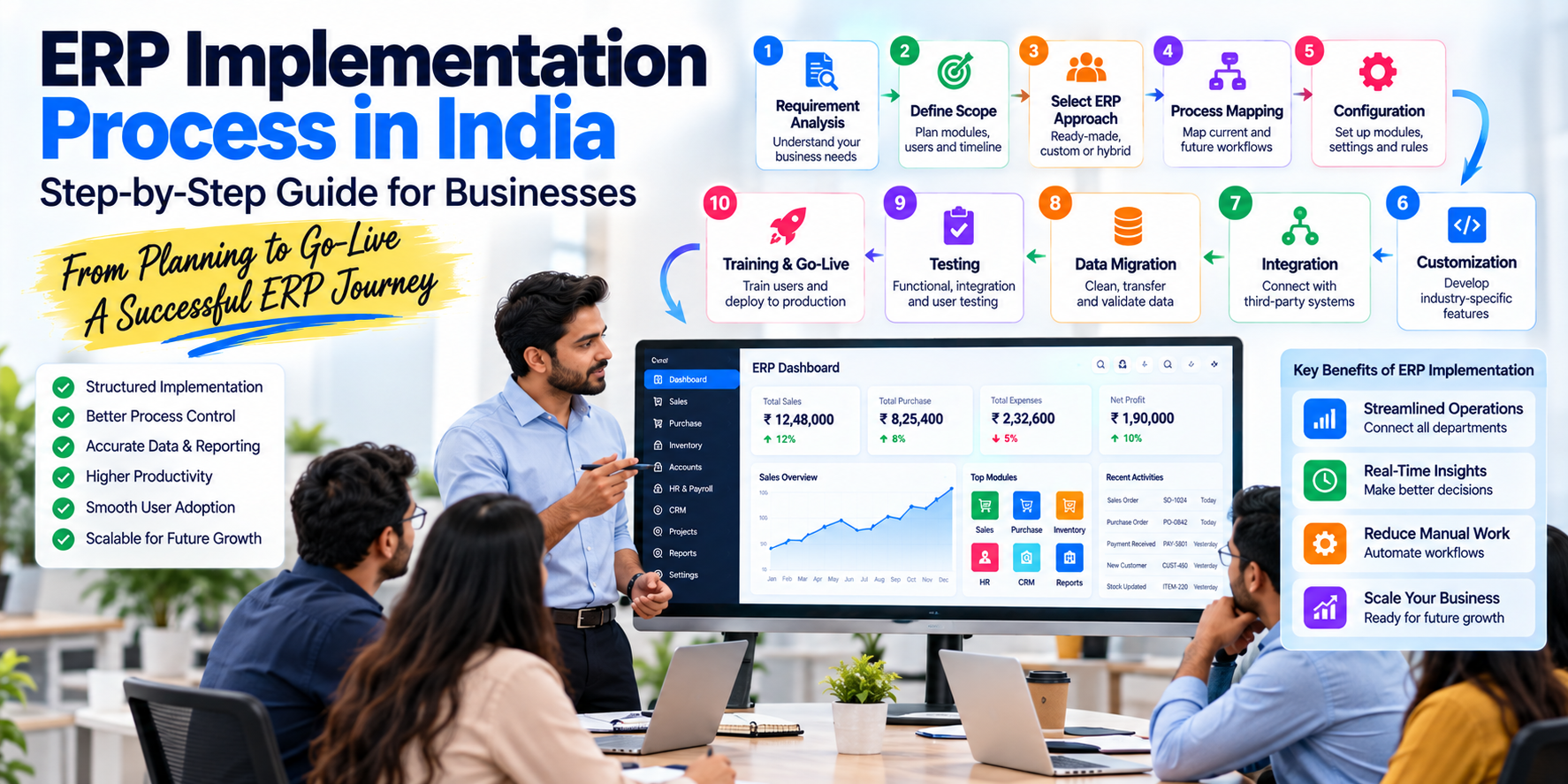
ERP Implementation Process: 10 Major Steps
A practical ERP implementation can be divided into the following stages:
- Business requirement analysis
- ERP selection
- Project planning
- Business-process mapping
- Configuration and customization
- Integration
- Data migration
- Testing
- Training and go-live
- Post-implementation support
Let's examine each stage.
1. Business Requirement Analysis
The first step is understanding what the business actually needs.
Before selecting or configuring an ERP, document existing processes.
For example:
Sales
Lead → Quotation → Order → Invoice → Payment
Purchase
Requirement → Approval → Purchase Order → Goods Receipt → Vendor Invoice → Payment
Inventory
Purchase → Warehouse → Stock → Transfer → Sale → Stock Deduction
Accounting
Invoice → Ledger → Receivable → Payment → Reconciliation → Reports
HR
Employee → Attendance → Leave → Payroll → Payslip
The objective is to understand how the business currently works and where the ERP should improve it.
2. Define the ERP Project Scope
One of the most important decisions is defining what will be included in the first implementation.
A business may want:
- Accounting
- CRM
- Sales
- Purchase
- Inventory
- HR
- Payroll
- Manufacturing
- Warehouse
- Projects
- Mobile app
- Analytics
- Automation
- Integrations
Trying to implement everything simultaneously can increase complexity.
A better approach may be to divide requirements into:
Phase 1 — Core
- Accounting
- Sales
- Purchase
- Inventory
Phase 2 — Operations
- CRM
- HR
- Payroll
- Warehouse
- Projects
Phase 3 — Advanced
- Mobile apps
- BI dashboards
- Advanced automation
- AI-assisted workflows
- Additional integrations
Oracle recommends defining scope, business units, rollout order and go-live requirements as part of ERP implementation planning.
3. Select the ERP or Development Approach
Businesses generally have several options.
Ready-Made ERP
A prebuilt system with standardized modules.
Suitable when the company's processes are reasonably close to the software's existing workflows.
Custom ERP
Software designed specifically around the company's requirements.
This can be useful where the business has unique workflows or industry-specific requirements.
Modular ERP
A business starts with selected modules and adds functionality later.
For example:
Accounting → Inventory → CRM → HR → Automation
Hybrid Approach
A business may use an ERP as the core system while integrating specialized third-party applications.
The appropriate approach depends on business requirements, budget, timeline and technical environment.
For a deeper comparison, see:
4. Create an ERP Implementation Team
ERP implementation should not be handled only by the software developer.
A cross-functional team is usually required.
Typical Participants
Management
Defines business objectives and approves major decisions.
Project Manager
Coordinates timelines, requirements and implementation activities.
Department Representatives
Represent:
- Accounts
- Sales
- Purchase
- Inventory
- HR
- Operations
- Production
Technical Team
Handles:
- Configuration
- Development
- APIs
- Integrations
- Infrastructure
- Security
ERP Implementation Partner
Helps translate business requirements into ERP functionality.
The people actually using the system should be involved early because they understand the practical workflow.
5. Map Current and Future Business Processes
This stage is often called process mapping.
Document the current process:
AS-IS
Then define the desired future process:
TO-BE
Existing Process
Customer places order → Salesperson writes order → Accountant creates invoice → Warehouse receives message → Stock updated manually.
ERP Process
Customer Order → ERP Sales Order → Automatic Stock Check → Approval → Invoice → Inventory Update → Accounting Entry → Customer Notification
The second process reduces manual handoffs.
The ERP should therefore be designed around actual business processes rather than simply reproducing every old manual activity.
6. ERP Configuration
Once processes are defined, the ERP can be configured.
Configuration may include:
- Company information
- Branches
- Warehouses
- Financial year
- Chart of accounts
- Tax settings
- User roles
- Approval levels
- Invoice formats
- Product categories
- Customer groups
- Vendor groups
- Pricing rules
- Notification settings
Oracle's implementation documentation describes planning, configuration, setup, deployment and ongoing maintenance as distinct activities.
7. ERP Customization and Development
Not every requirement can necessarily be handled through standard configuration.
Some businesses need custom development.
Examples include:
- Industry-specific workflows
- Custom dashboards
- Special reports
- Custom approval systems
- Unique pricing calculations
- Specialized inventory logic
- Custom mobile applications
- Customer portals
- Vendor portals
- Specialized API integrations
- Automated business rules
The important distinction is:
Configuration changes how existing ERP functionality behaves.
Customization adds or modifies functionality to meet specific requirements.
A careful implementation should determine which requirements truly need custom development.
8. ERP Integration
Most businesses already use other software.
An ERP may need to communicate with:
- Payment gateways
- Banks
- E-commerce websites
- POS systems
- CRM systems
- SMS
- Shipping providers
- GPS systems
- Biometric devices
- Accounting systems
- Government-related services
- Mobile applications
For example:
E-commerce Website → ERP → Inventory
When an online order is received, the ERP may need to update:
- Customer
- Order
- Inventory
- Payment
- Invoice
- Accounting
Oracle notes that integration with third-party or legacy systems is often an important part of ERP implementation.
9. ERP Data Migration
Data migration is one of the most important implementation stages.
Businesses may have existing data stored in:
- Excel files
- Old ERP software
- Accounting software
- Databases
- POS systems
- CRM platforms
- Paper records
Typical ERP Migration Data
Master Data
- Customers
- Vendors
- Products
- Employees
- Warehouses
- Accounts
Transactional Data
- Sales
- Purchases
- Payments
- Receipts
- Stock transactions
Financial Data
- Opening balances
- Ledgers
- Receivables
- Payables
Data Cleansing Before Migration
Old data should not automatically be moved into the new ERP.
It may contain:
- Duplicate customers
- Incorrect addresses
- Old products
- Duplicate vendors
- Missing GST information
- Incorrect balances
- Inconsistent product names
Therefore:
Extract → Clean → Validate → Transform → Test → Import
is generally more appropriate than simply copying everything.
Oracle specifically highlights data quality, normalization, migration and validation during ERP implementation.
SAP's migration documentation also describes repeated migration testing and refinement before moving data into production.
10. ERP Testing
Testing should happen before employees begin using the ERP for live operations.
Important testing areas include:
Functional Testing
Does each module work correctly?
Integration Testing
Do connected systems exchange information correctly?
Data Testing
Was information migrated accurately?
Security Testing
Can users access only what they are authorized to access?
Workflow Testing
Do approvals and automated processes work correctly?
Performance Testing
Can the system handle expected users and transaction volumes?
User Acceptance Testing
Can actual employees complete their day-to-day work successfully?
SAP's implementation methodology includes testing individual configurations as well as broader end-to-end business and integration processes.
11. User Training
A technically correct ERP can still fail operationally if employees do not know how to use it.
Training should be role-specific.
Accountant
- Invoices
- Payments
- Ledger
- GST
- Reports
Sales Team
- Customers
- Quotations
- Orders
- Sales
- Follow-ups
Warehouse Team
- Stock
- Receiving
- Transfers
- Dispatch
HR
- Employees
- Attendance
- Leave
- Payroll
Management
- Dashboard
- Reports
- Approvals
- Analytics
SAP's implementation guidance emphasizes end-user training and continued onboarding as users join an organization.
12. Pilot Testing
Before deploying an ERP across the entire company, a pilot can be useful.
For example:
Branch A → Pilot
Then:
Branch B + Branch C → Rollout
A pilot allows the organization to identify:
- Workflow problems
- Missing features
- Training gaps
- Data issues
- Integration problems
- User feedback
SAP specifically recommends pilot-style validation of business processes before full rollout in its implementation guidance.
13. Go-Live Preparation
Go-live is the point where the ERP becomes the operational production system.
Before go-live, verify:
- Data migration completed
- Users created
- Permissions configured
- Integrations working
- Reports validated
- Backups configured
- Employees trained
- Open critical issues resolved
- Support process established
- Cutover plan approved
SAP describes final preparation as including user readiness, system readiness, cutover activities and the transition into production.
14. ERP Cutover
Cutover is the transition from the old system to the new ERP.
A simplified example:
Friday
Old system active.
Weekend
- Stop transactions
- Take final backup
- Export remaining data
- Complete migration
- Validate balances
- Configure production environment
Monday
New ERP becomes the primary operational system.
The exact schedule depends on the business.
For a company operating 24/7, a weekend cutover may not be appropriate.
15. ERP Go-Live
Once the system is validated and approved, the organization starts using the ERP for live operations.
Go-live does not mean the project is completely finished.
The first few weeks can reveal:
- User questions
- Configuration gaps
- Reporting requirements
- Workflow improvements
- Integration issues
- Additional training requirements
Therefore, post-go-live support is important.
16. Post-Implementation Support
After launch, the implementation team should monitor the system.
Support may include:
- Bug fixing
- User assistance
- Performance monitoring
- Data validation
- Report changes
- Workflow improvements
- Security updates
- Integration maintenance
- New feature development
SAP's implementation guidance also describes a post-go-live support phase and recommends reviewing system performance and planning future enhancements.
ERP Implementation Timeline
There is no universal ERP implementation timeline.
A small focused ERP may require considerably less work than a multi-branch manufacturing ERP with several integrations and large-scale data migration.
A simplified planning example might look like:
| Phase | Typical Planning Focus |
|---|---|
| Requirement Analysis | Business processes and requirements |
| ERP Selection | Platform and implementation approach |
| Planning | Team, scope and roadmap |
| Design | Workflows and system architecture |
| Configuration | Core ERP setup |
| Development | Custom features |
| Integration | Third-party systems |
| Data Migration | Cleaning and importing data |
| Testing | Functional and end-to-end validation |
| Training | User preparation |
| Go-Live | Production deployment |
| Support | Optimization and improvements |
The actual duration should be estimated after assessing the number of modules, users, locations, integrations, data volume, custom development and implementation scope.
ERP Implementation Cost in India
ERP implementation cost is separate from simply purchasing ERP software.
Total project cost may include:
- ERP license or subscription
- Implementation services
- Configuration
- Custom development
- Data migration
- Integrations
- Testing
- Training
- Hosting
- Security
- Support
- Maintenance
For example, a company purchasing a standard ERP may have relatively limited customization requirements.
A manufacturing company requiring:
Production + Inventory + Procurement + Accounting + Multi-Branch + Mobile App + Custom Reports + Multiple Integrations
will have a substantially different implementation scope.
For a detailed pricing discussion, see:
ERP Software Cost in India (2026)
Common ERP Implementation Challenges
1. Unclear Requirements
If requirements are not properly documented, scope changes can occur during development.
2. Poor Data Quality
Incorrect or duplicate legacy data can create problems after migration.
3. Too Much Customization
Excessive customization can increase development and maintenance requirements.
4. Lack of User Training
Employees may continue using old processes or spreadsheets.
5. Inadequate Testing
Problems may only become visible after go-live.
6. Poor Change Management
Employees may resist changing established workflows.
7. Integration Problems
Connected systems may not exchange data correctly.
8. Scope Creep
Additional features added during development can affect budget and schedule.
SAP's 2026 implementation guidance specifically recommends breaking work into phases, estimating effort, conducting pilots, cleansing data and maintaining communication with stakeholders.
ERP Implementation Best Practices
Start With Business Processes
Don't begin with a list of software features alone.
Start with:
How does the business work?
Keep Phase 1 Focused
Implement the most important workflows first.
Clean Data Early
Do not wait until the final week to start migration preparation.
Involve Actual Users
Employees who use the system daily should participate in testing.
Test End-to-End Processes
Don't test only individual screens.
Test complete workflows.
For example:
Quotation → Sales Order → Inventory → Invoice → Payment → Accounting
Document Everything
Maintain documentation for:
- Processes
- Configurations
- Integrations
- User roles
- Data migration
- Testing
- Training
Plan for Post-Go-Live Support
ERP optimization continues after deployment.
ERP Implementation for Different Industries
ERP implementation varies significantly by industry.
Retail
Focus on:
- POS
- Inventory
- Purchasing
- Sales
- Accounting
- Customer management
Manufacturing
Focus on:
- Production
- BOM
- Raw materials
- Procurement
- Inventory
- Quality
- Costing
Wholesale & Distribution
Focus on:
- Inventory
- Purchase
- Sales
- Customer credit
- Warehouse
- Receivables
- Transport
Transport
Focus on:
- Vehicles
- Drivers
- Trips
- Fuel
- Maintenance
- Expenses
- Customer billing
Education
Focus on:
- Students
- Fees
- Attendance
- Exams
- Staff
- Transport
- Parent communication
Healthcare
Focus on:
- Patients
- Appointments
- Billing
- Pharmacy
- Inventory
- Staff
- Reports
The implementation roadmap should therefore be customized according to the organization's industry.
Custom ERP Implementation in India
For businesses with unique workflows, custom ERP implementation can combine standard ERP concepts with purpose-built functionality.
For example, a company may require:
Core ERP
- Accounting
- Sales
- Purchase
- Inventory
plus:
Custom Operations
- Industry-specific workflow
- Custom mobile app
- Custom reports
- Approval system
- Customer portal
- Vendor portal
- API integrations
This approach can be useful when existing software does not adequately match the organization's processes.
ERP Implementation in Hansi, Hisar, Haryana and India
Businesses in Hansi, Hisar, Rohtak, Jind, Bhiwani and other parts of Haryana may have very different ERP requirements depending on their industries.
For example:
- Retailers may need billing and inventory
- Manufacturers may need production ERP
- Transport companies may need fleet management
- Distributors may need stock and sales management
- Schools may need education ERP
- Clinics may need healthcare management
- Service companies may need CRM and project management
An ERP implementation should therefore be based on business size, industry, processes, users and future growth, rather than simply selecting the software with the largest feature list.
ERP Solutions and Custom Software Development
Cycode Technologies works across ERP, SaaS, business software and industry-specific applications.
Its software ecosystem includes solutions for areas such as:
- School management
- Accounting
- Retail and inventory
- Restaurant operations
- Transport management
- Hospital and clinic management
- Business SaaS
For organizations requiring a specialized workflow, custom ERP development can also combine accounting, inventory, CRM, HR, automation, mobile applications, APIs and industry-specific modules into a unified business platform.
Frequently Asked Questions
What is the ERP implementation process?
The ERP implementation process generally includes requirement analysis, planning, process mapping, ERP configuration, customization, integration, data migration, testing, training, deployment and post-go-live support.
How long does ERP implementation take?
There is no fixed timeline. Implementation duration depends on modules, users, branches, integrations, data volume, customization and project complexity.
What is ERP data migration?
ERP data migration is the process of transferring relevant information from existing systems into the new ERP after cleaning, transforming and validating the data.
Why is ERP testing important?
Testing helps verify that ERP modules, workflows, integrations, security permissions and migrated data work correctly before the system is used for live operations.
What is ERP go-live?
Go-live is the transition when the configured ERP becomes the production system used for actual business transactions.
What happens after ERP go-live?
The organization enters a support and optimization stage where issues are resolved, users receive assistance and additional improvements may be implemented.
Can ERP implementation be done in phases?
Yes. Businesses can implement core modules first and add additional modules or integrations in later phases.
Should ERP data be cleaned before migration?
Yes. Cleaning and validating data before migration can help reduce duplicate, incomplete or incorrect records in the new ERP. Oracle and SAP both emphasize data quality and migration validation in their implementation guidance.
Is custom ERP implementation more complex?
Custom ERP projects can involve additional requirements analysis, development, testing and maintenance compared with using a largely standard system. The complexity depends on the amount of customization and integration required.
Conclusion
ERP implementation is much more than installing software.
It involves transforming how a business manages its:
People + Processes + Data + Technology
A structured implementation can move an organization from disconnected spreadsheets and applications toward a centralized business system.
The most important stages are:
Plan → Analyze → Design → Configure → Customize → Integrate → Migrate → Test → Train → Go Live → Optimize
The right implementation strategy depends on the business's actual requirements, industry, number of users, locations, existing software and future growth.
For businesses looking for ERP development and implementation in Hansi, Hisar, Haryana or across India, the implementation roadmap should be designed around the specific business rather than forcing every organization into the same ERP structure.