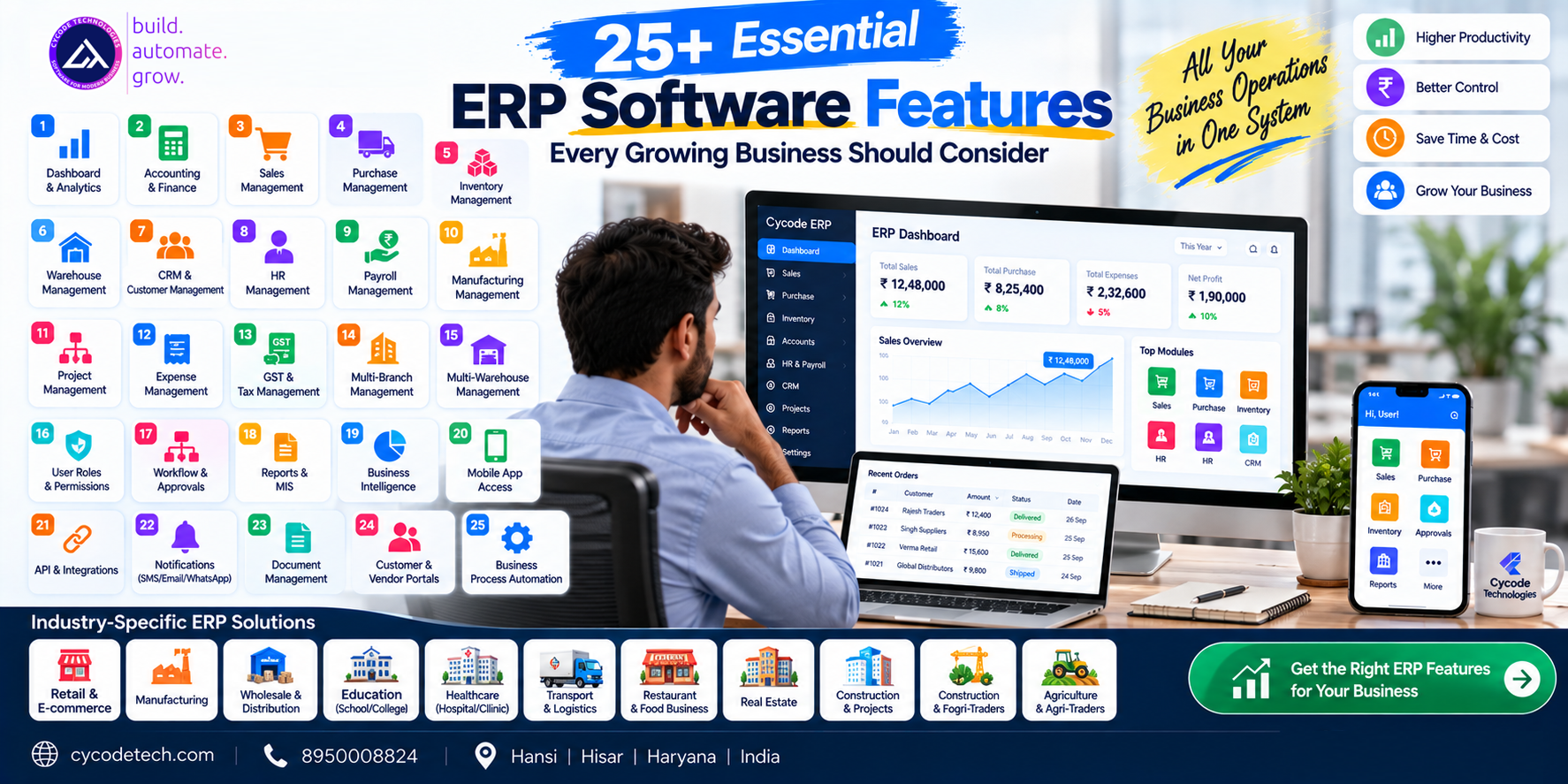
ERP Software Features: 25+ Essential Features Every Growing Business Should Consider
As a business grows, managing accounting, sales, purchases, inventory, employees, customers, vendors and daily operations through separate software can become increasingly difficult.
This is where ERP software becomes valuable.
An Enterprise Resource Planning system brings multiple business functions together through connected modules and shared data. Modern ERP platforms can cover areas such as finance, procurement, inventory, supply chain, project management, human resources, manufacturing, analytics and more.
But having an ERP system is not enough.
The features inside the ERP determine whether it actually fits the way a business operates.
A retailer may need powerful inventory and billing features. A manufacturer may need production planning and raw-material management. A transport company may need fleet, fuel and trip management. A school may require student, fee, examination and transport modules.
Therefore, businesses should evaluate ERP software based on functionality, scalability, integrations, security and actual business workflows rather than simply counting the number of modules.
In this guide, we explore 25+ important ERP software features that growing businesses should consider.
1. What Is ERP Software?
ERP stands for Enterprise Resource Planning.
ERP software connects different business functions into a centralized system so that information can flow between departments instead of remaining isolated in separate applications.
Depending on the business and ERP platform, modules can include:
- Accounting and finance
- Sales
- Purchase
- Inventory
- CRM
- Human resources
- Payroll
- Manufacturing
- Procurement
- Project management
- Warehouse management
- Reporting and analytics
- Customer management
- Document management
- Workflow automation
Oracle describes ERP as software that can support areas including finance, procurement, supply chain, inventory, manufacturing, order management, project management, logistics, HR and related business functions.
The exact combination of modules depends on the organization.
2. Why ERP Software Features Matter
Two ERP systems can both advertise themselves as "complete ERP software" while providing very different functionality.
For example:
ERP A
- Accounting
- Billing
- Inventory
ERP B
- Accounting
- Inventory
- CRM
- HR
- Payroll
- Purchase
- Sales
- Warehouse
- Workflow
- Analytics
- Mobile application
- API integrations
The second system may be more appropriate for a business with complex operations, but not necessarily for every company.
The right question is therefore:
Which ERP features does your business actually need?
Important considerations include:
- Current business processes
- Number of employees
- Number of users
- Number of branches
- Number of warehouses
- Industry requirements
- Regulatory requirements
- Integration requirements
- Reporting requirements
- Future growth
- Mobile requirements
3. 25+ Essential ERP Software Features
Let's look at the major features businesses should evaluate.
1. ERP Dashboard
A centralized dashboard gives management a quick overview of important business information.
A good dashboard can display:
- Sales
- Purchases
- Revenue
- Expenses
- Outstanding payments
- Inventory
- Receivables
- Payables
- Employee information
- Pending approvals
- Business KPIs
- Recent transactions
Instead of opening multiple reports, decision-makers can start with a single business overview.
2. Accounting and Financial Management
Accounting is one of the most important ERP modules.
Modern ERP financial functionality can include:
- General ledger
- Accounts payable
- Accounts receivable
- Invoices
- Expenses
- Payments
- Receipts
- Journal entries
- Bank reconciliation
- Financial reports
- Cash-flow information
- Budgets
- Tax management
Oracle identifies finance and accounting as core ERP capabilities, including areas such as accounts payable, receivables, expenses, invoices and cash management.
For Indian businesses, ERP accounting may also need GST-related workflows depending on the business model and implementation.
3. Sales Management
An ERP can connect the sales process with inventory, customers and accounting.
Common sales functionality includes:
- Quotations
- Sales orders
- Invoices
- Sales returns
- Discounts
- Customer pricing
- Payment tracking
- Salesperson management
- Sales targets
- Commission calculation
- Sales reports
This creates a connected flow from lead/order → sale → invoice → payment → accounting.
4. Purchase and Procurement Management
Purchase management helps businesses control procurement from suppliers.
Features may include:
- Purchase requisitions
- Supplier management
- RFQs
- Purchase quotations
- Purchase orders
- Goods receipt
- Purchase invoices
- Purchase returns
- Vendor payments
- Purchase reports
- Approval workflows
ERP platforms commonly connect procurement with financial and operational processes.
5. Inventory Management
Inventory is particularly important for retailers, wholesalers, distributors and manufacturers.
An ERP inventory module may provide:
- Stock management
- Stock in/out
- Stock adjustments
- Stock valuation
- Reorder levels
- Batch tracking
- Serial-number tracking
- Expiry tracking
- Stock transfers
- Inventory reports
- Purchase-to-stock integration
- Sales-to-stock integration
Modern ERP inventory systems can also support warehouse transfers, stock counts, shipments, packages and inventory adjustments.
6. Warehouse Management
For businesses operating warehouses, basic inventory functionality may not be enough.
Warehouse features can include:
- Multiple warehouses
- Warehouse locations
- Bin management
- Stock transfers
- Picklists
- Putaway
- Dispatch management
- Warehouse-wise stock
- Stock counting
- Shipment tracking
This becomes particularly useful as businesses expand from one location to multiple warehouses.
7. CRM and Customer Management
ERP and CRM functionality can work together to give businesses a broader customer view.
CRM features may include:
- Customer database
- Leads
- Opportunities
- Follow-ups
- Sales pipeline
- Customer communication
- Sales history
- Customer outstanding
- Customer documents
- Customer service records
For many businesses, integrating CRM with sales and accounting avoids maintaining customer information separately.
8. Human Resource Management
HR functionality allows businesses to manage employee information centrally.
Typical features include:
- Employee profiles
- Departments
- Designations
- Joining information
- Employee documents
- Attendance
- Leave management
- Employee lifecycle
- HR reports
Larger ERP systems may integrate HR information directly with finance and payroll.
9. Payroll Management
Payroll can be connected with employee attendance and HR information.
Possible functionality includes:
- Salary structures
- Monthly payroll
- Attendance-based salary
- Overtime
- Incentives
- Deductions
- Payslips
- Payroll reports
- Statutory calculations
- Employee payment records
The exact payroll and statutory requirements should be configured according to the organization's workforce and applicable regulations.
10. Manufacturing Management
Manufacturing businesses often require ERP functionality beyond accounting and inventory.
Manufacturing modules can include:
- Bill of materials
- Production planning
- Raw-material management
- Work orders
- Production orders
- Material consumption
- Finished goods
- Production costing
- Work-in-progress
- Quality control
- Production reports
ERP platforms can connect manufacturing with inventory, procurement, finance and supply-chain processes.
11. Project Management
For agencies, IT companies, construction businesses and professional-service organizations, project management can be an important ERP feature.
Features may include:
- Projects
- Tasks
- Milestones
- Team assignment
- Timesheets
- Project budgets
- Expenses
- Project profitability
- Progress tracking
- Client billing
This allows management to connect project activity with financial information.
12. Expense Management
Businesses generate many expenses outside direct purchases.
An ERP expense module can help manage:
- Employee expenses
- Travel expenses
- Office expenses
- Petty cash
- Expense approvals
- Expense categories
- Receipts
- Reimbursements
- Expense reports
Connecting expenses with accounting creates a more complete financial picture.
13. GST and Tax Management
For Indian businesses, tax-related functionality can be an important ERP consideration.
Depending on the ERP and implementation, functionality may include:
- GST calculation
- GST invoices
- Tax configuration
- Input tax tracking
- Output tax tracking
- E-invoicing
- E-way bill workflows
- TDS/TCS-related functionality
- Tax reports
- GST reconciliation
For example, Indian ERP platforms may provide GST, e-invoicing, e-way bill and tax-related workflows.
Businesses should verify that the specific ERP supports the compliance workflows applicable to them.
14. Multi-Branch Management
Growing businesses often operate multiple:
- Offices
- Shops
- Branches
- Business units
- Service locations
A multi-branch ERP can allow organizations to maintain centralized control while viewing branch-specific information.
Useful functionality includes:
- Branch-wise sales
- Branch-wise purchases
- Branch-wise expenses
- Branch-wise inventory
- Branch-wise accounting
- Branch-wise reports
- User access by branch
Some ERP systems support separate locations, transactions and reports for different business locations.
15. Multi-Warehouse Management
A business may have:
Head Office → Warehouse A → Warehouse B → Retail Stores
An ERP should be able to track stock movement between these locations where required.
Important features include:
- Warehouse-wise stock
- Stock transfer
- Warehouse receiving
- Warehouse dispatch
- Location-level inventory
- Stock adjustment
- Warehouse reports
16. User Roles and Permissions
Not every employee should have access to every ERP function.
Role-based access can control:
- Which modules users can access
- Which records they can view
- Which transactions they can create
- Which transactions they can edit
- Which reports they can access
- Which approvals they can perform
For example:
- Sales Executive → Customers + Sales
- Accountant → Accounting + Reports
- Warehouse Manager → Inventory + Warehouse
- Director → Dashboard + Reports + Approvals
This helps businesses implement controlled access across departments.
17. Workflow and Approval Management
ERP software can automate approval processes.
Examples:
- Purchase Request → Manager Approval → Purchase Order
- Expense → Department Approval → Accounts → Payment
- Leave Request → Manager Approval → HR
- Discount Request → Sales Manager → Finance
Workflow automation can reduce manual coordination and create a more structured approval process. Oracle identifies workflows, predefined approvals and role-based access as examples of ERP business-process controls.
18. Reports and Analytics
ERP software should not only store data—it should help businesses understand it.
Common reports include:
- Sales reports
- Purchase reports
- Profit and loss
- Balance sheet
- Cash flow
- Inventory reports
- Customer outstanding
- Supplier outstanding
- Expense reports
- Employee reports
- Branch reports
- Tax reports
- Product performance
- Salesperson performance
Dashboards and visualization tools can make operational information easier to analyze.
19. Business Intelligence and KPIs
Advanced ERP systems may include business intelligence capabilities.
Businesses can monitor KPIs such as:
- Revenue
- Gross margin
- Net profit
- Sales growth
- Inventory turnover
- Outstanding receivables
- Purchase trends
- Customer growth
- Branch performance
- Employee productivity
This turns ERP data into management information.
20. Mobile ERP Application
Modern businesses do not always operate from a desktop.
A mobile ERP application can allow authorized users to:
- View dashboards
- Check sales
- Create orders
- Check inventory
- Approve requests
- View customers
- Track tasks
- Check payments
- Receive notifications
- Access reports
Mobile applications can be particularly useful for owners, sales teams, field employees and managers.
21. API and Third-Party Integrations
Businesses rarely use only one software system.
ERP systems may need to communicate with:
- Payment gateways
- Banking systems
- E-commerce platforms
- CRM systems
- SMS
- Shipping platforms
- Accounting systems
- Biometric devices
- GPS systems
- POS systems
- Government or compliance services
APIs allow different systems to exchange information.
This is especially important for businesses that already have software infrastructure and do not want to replace everything.
22. Notifications and Communication
ERP systems can provide automated notifications through channels such as:
- SMS
- Push notifications
- In-app alerts
Examples:
- Invoice Generated → Customer Notification
- Payment Due → Reminder
- Purchase Approved → Procurement Notification
- Low Stock → Inventory Alert
- Leave Approved → Employee Notification
Automation reduces the need for employees to manually communicate every update.
23. Document Management
Businesses generate large numbers of documents.
An ERP can centralize documents such as:
- Invoices
- Purchase documents
- Employee documents
- Contracts
- Quotations
- Receipts
- Customer documents
- Vendor documents
- Project files
Some ERP platforms provide centralized document functionality and allow files to be attached to transactions.
24. Customer and Vendor Portals
For businesses with large customer or supplier networks, portals can provide controlled self-service access.
Customer Portal
A customer portal might allow customers to:
- View quotations
- View invoices
- Check payments
- Download documents
- Raise requests
- Track orders
Vendor Portal
A vendor portal may support:
- Purchase orders
- Supplier documents
- Delivery information
- Payment status
- Communication
This can reduce repetitive communication between internal teams and external parties.
25. Business Process Automation
Automation is one of the major reasons businesses implement ERP systems.
Instead of manually repeating tasks, the system can automate workflows such as:
Order → Inventory Update → Invoice → Accounting Entry → Notification
or:
Purchase → Approval → PO → Goods Receipt → Invoice → Payment
ERP automation can reduce repetitive manual work and help standardize processes.
26. Cloud Deployment
Cloud-based ERP allows businesses to access their system through the internet rather than relying exclusively on software installed on a particular computer.
Potential benefits include:
- Remote access
- Centralized data
- Easier deployment
- Scalability
- Automatic updates depending on provider
- Access across branches
- Web and mobile connectivity
Cloud ERP is now offered across a broad range of business functions and can combine finance, supply chain, procurement and other capabilities.
27. Security and Audit Logs
ERP systems contain sensitive business information.
Security features can include:
- User authentication
- Role-based permissions
- Login controls
- Audit logs
- Transaction history
- Data backups
- Access monitoring
- Password policies
- Session management
Audit trails are particularly useful for financial and operational transactions because businesses may need to understand who created, changed or approved a particular record.
28. Scalability
One of the most overlooked ERP features is the ability to grow with the business.
An ERP should ideally accommodate changes such as:
10 employees → 50 employees → 200 employees
or:
1 branch → 5 branches → 20 branches
The same applies to:
- Transactions
- Customers
- Products
- Warehouses
- Users
- Data
- Integrations
Scalability should therefore be evaluated before selecting an ERP.
ERP Features by Business Type
Not every organization needs all 25+ features.
The priorities can vary considerably.
| Business | Important ERP Features |
|---|---|
| Retail | POS, sales, inventory, accounting, purchase |
| Wholesale | Inventory, purchase, sales, customer credit, accounting |
| Manufacturing | Production, BOM, inventory, procurement, costing |
| Transport | Fleet, trips, fuel, maintenance, accounting |
| School | Student management, fees, attendance, exams, HR, transport |
| Hospital/Clinic | Patients, appointments, billing, pharmacy, inventory |
| Restaurant | POS, kitchen, inventory, billing, QR ordering |
| Service Business | CRM, projects, tasks, billing, expenses |
| Distributor | Inventory, sales, purchase, schemes, receivables |
| E-commerce | Orders, inventory, customers, payments, shipping |
This is why an industry-specific ERP or custom ERP can sometimes be more suitable than a generic system.
Essential ERP Features vs Advanced ERP Features
A business does not necessarily need every advanced feature on day one.
Essential ERP Features
For many small and growing businesses:
- Accounting
- Sales
- Purchase
- Inventory
- Customers
- Vendors
- Invoicing
- Reports
- User permissions
- Tax management
Advanced ERP Features
As the organization grows:
- Multi-branch
- Multi-warehouse
- Manufacturing
- Advanced CRM
- Workflow automation
- Mobile apps
- API integrations
- Business intelligence
- Advanced analytics
- Customer/vendor portals
- AI-assisted workflows
- Advanced approval systems
A phased approach can allow businesses to implement the most important functionality first and expand later.
Custom ERP Features vs Standard ERP Features
A ready-made ERP generally provides predefined functionality.
A custom ERP can be designed around a company's specific workflow.
For example, a transport company might need:
Trip Creation → Vehicle Assignment → Driver Assignment → Fuel → Toll → Expenses → Customer Billing → Profitability
A generic accounting package may not provide this entire workflow.
A custom ERP can be developed around it.
This is one of the major differences between custom ERP development and simply purchasing standard business software.
For businesses evaluating this decision, see our related guide:
Custom ERP vs Ready-Made ERP: Which Approach Fits Your Business?
How to Choose the Right ERP Features
Before selecting an ERP, create a feature checklist.
Step 1: List your current processes
Document:
- How sales happen
- How purchases happen
- How inventory is managed
- How accounts are maintained
- How employees are managed
- How approvals happen
- How reports are generated
Step 2: Identify repetitive work
Look for tasks that employees perform manually every day.
These are potential automation opportunities.
Step 3: Identify integration requirements
List existing systems that need to communicate with the ERP.
Step 4: Separate essential and optional features
Create three categories:
- Must Have
- Should Have
- Future Requirement
Step 5: Consider future growth
Don't evaluate the ERP only for today's business size.
Consider where the business could be in three to five years.
ERP Software Features and Cost
More features do not automatically mean better value.
Every additional module can affect:
- Development cost
- Implementation time
- Customization
- Training
- Integration
- Maintenance
- Hosting
- Support
The cost of an ERP therefore depends on much more than the number of features.
For a detailed discussion, read:
ERP Software Cost in India (2026): Complete Pricing Guide
ERP Development for Businesses in India
Businesses in India often need ERP systems adapted to their specific operational and tax requirements.
Depending on the organization, an ERP may need:
- GST workflows
- Accounting
- Inventory
- Multi-branch management
- Mobile applications
- Payment integrations
- WhatsApp/SMS communication
- API integrations
- Role-based access
- Custom reports
- Industry-specific workflows
A custom ERP development company can build these components around the actual business process rather than forcing the organization to completely change its workflow.
Cycode Technologies ERP Solutions
At Cycode Technologies, ERP and business software can be developed around different business requirements, from accounting and inventory to industry-specific operational systems.
The broader software ecosystem includes solutions such as:
- EduMittar — School Management ERP
- AccuBook — Accounting and GST-focused business software
- Vendly — Business accounting and inventory ERP
- FleetLogic — Transport and fleet management
- KwikDine — Restaurant POS and ordering
- PulsePanel — Hospital and clinic management
- CyFlo — Modular business SaaS and reseller platform
Businesses can also consider custom ERP development when standard functionality does not adequately match their processes.
For organizations in Hansi, Hisar, Haryana and across India, the right ERP architecture can be designed around the company's industry, workflow, users, branches and future expansion requirements.
Frequently Asked Questions
What are ERP software features?
ERP software features are the functions and capabilities provided by an ERP system to manage business processes such as accounting, sales, purchasing, inventory, HR, manufacturing, reporting and automation.
What are the most important ERP features?
For many businesses, accounting, sales, purchase, inventory, customer management, reporting, user permissions and workflow management are among the core features to evaluate.
However, the required features depend on the industry and business workflow.
What are ERP modules?
ERP modules are functional sections of an ERP system dedicated to specific business areas, such as finance, inventory, sales, HR, procurement, manufacturing or CRM.
Does ERP include accounting?
Accounting and financial management are core capabilities of many ERP systems. They can include general ledger, accounts payable, accounts receivable, expenses, invoices, payments and financial reporting.
Can ERP manage inventory?
Yes. ERP inventory functionality can include stock management, warehouse management, transfers, stock counts, adjustments, batch or serial tracking and inventory reporting, depending on the system.
Can ERP software support multiple branches?
Many ERP systems support multiple business locations or branches, with branch-specific transactions, inventory and reporting depending on the implementation.
Does ERP have a mobile app?
Some ERP systems provide dedicated mobile applications or mobile-responsive interfaces. Mobile ERP functionality can allow authorized users to access dashboards, transactions, approvals and reports remotely.
Can an ERP integrate with other software?
Yes. ERP systems can integrate with external applications through APIs and other integration mechanisms. Common integrations include payment gateways, CRM, e-commerce, communication platforms, POS, logistics and specialized business systems.
What is custom ERP software?
Custom ERP software is designed or modified specifically around the workflows and requirements of a particular business or industry.
Is ERP suitable for small businesses?
ERP can be suitable for small businesses when the selected system matches their operational complexity, budget and growth requirements. A smaller company may begin with essential modules and expand functionality as it grows.
Final Thoughts
ERP software is not simply a collection of modules.
A useful ERP connects people, processes, data and departments into a coordinated business system.
The right feature set depends on the organization.
A small retailer may prioritize:
Billing + Inventory + Accounting
A manufacturer may require:
Production + Procurement + Inventory + Costing + Accounting
A growing multi-branch company may need:
ERP + CRM + HR + Analytics + Automation + Mobile + Integrations
The objective should therefore be to select or develop an ERP around the actual business workflow, while keeping future scalability in mind.
For businesses looking for ERP software development in Hansi, Hisar, Haryana or across India, Cycode Technologies can work on standard, modular and custom business software requirements.