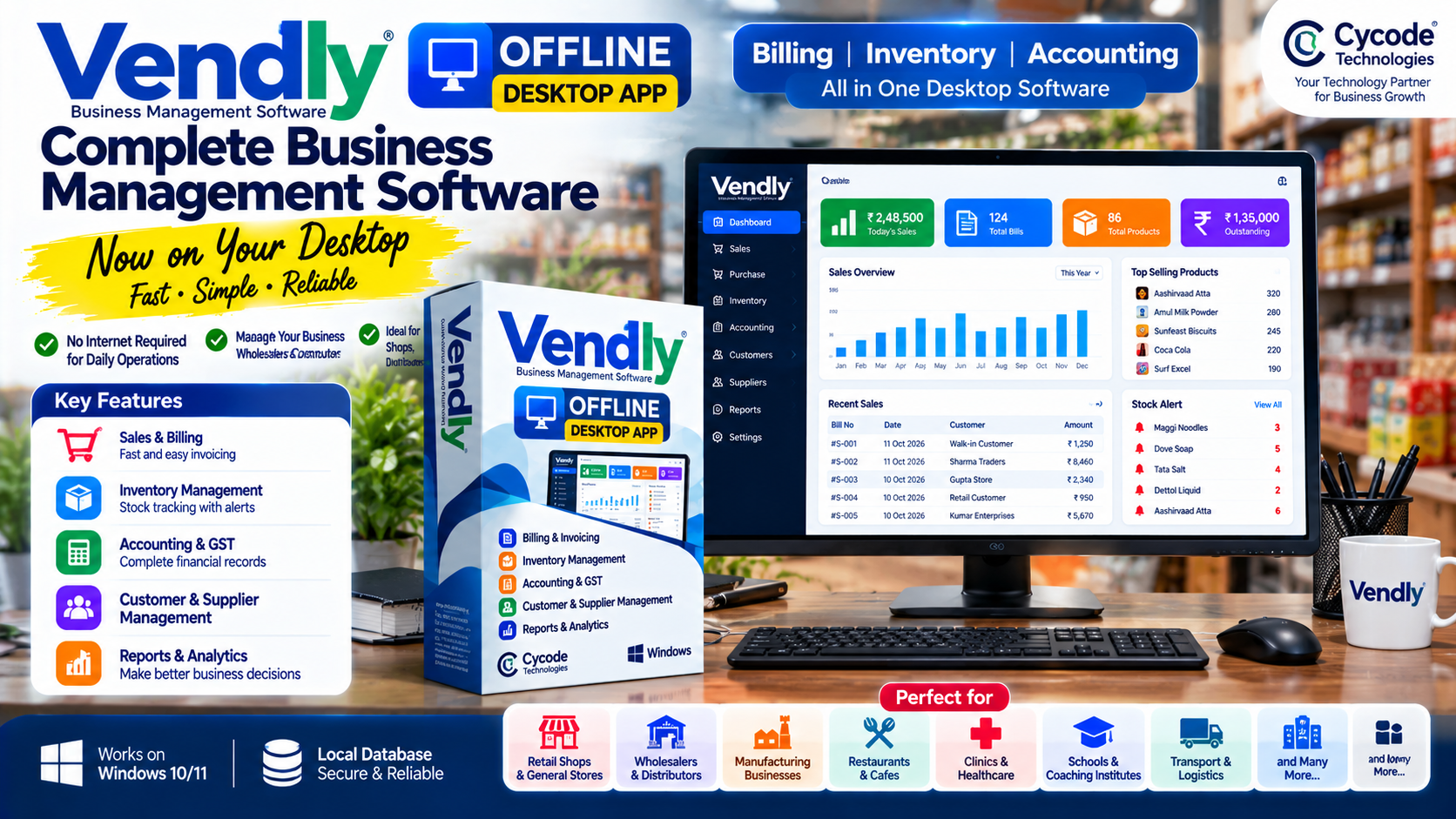
Introduction: Meet Vendly Offline Desktop App
Businesses need reliable software to manage sales, purchase records, inventory, billing and accounts. However, not every business has a stable internet connection throughout the working day, and some business owners prefer running their core software directly on their own computer.
To address this need, Cycode Technologies has developed Vendly Offline Desktop App, a desktop-based version of Vendly designed to bring essential business management operations to a local computer environment.
Vendly Offline aims to help shop owners, retailers, wholesalers, distributors and other businesses manage their day-to-day work without relying on a continuous internet connection for local operations.
Whether you operate a retail shop, a wholesale business, a distribution company or a growing trading enterprise, Vendly provides a desktop-based approach to business management.
What Is Vendly Offline Desktop Software?
Vendly Offline Desktop App is a business management application designed to run on a desktop computer rather than relying exclusively on a browser-based, cloud-connected workflow.
It is intended for businesses that want to manage their routine operations through a dedicated desktop environment, with business data handled locally according to the application's configuration.
The software focuses on practical business needs such as:
- Sales billing and invoice management
- Purchase and stock records
- Inventory management
- Accounting and financial records
- Day-to-day business transaction management
The exact features available depend on the installed version and configured modules.
Unlike a cloud-only workflow, a locally operated desktop application can allow supported tasks to continue when the internet connection is unavailable. This makes offline capability particularly relevant for businesses that need dependable access to their local business records.
Why Do Businesses Need Offline Billing and Inventory Software?
Many businesses still face practical challenges when using online-only software.
1. Unstable Internet Connectivity
An unreliable internet connection can interrupt access to cloud-based applications. Businesses that need to create bills, check stock or review local records during working hours may prefer software that supports offline operation.
2. Faster Access to Routine Business Tasks
A desktop application gives users a dedicated environment for their regular work. Depending on the computer's performance and software configuration, local operations can be performed without waiting for a remote server response.
3. Better Control Over Local Business Data
Some business owners prefer keeping their operational records on a computer under their own control. A local database can support this preference, although appropriate access controls, backups and device security remain important.
4. Suitable for Traditional Retail and Wholesale Businesses
Many retailers and wholesalers need practical tools for billing, stock tracking and transaction records without introducing unnecessary complexity into their daily workflow.
Vendly Offline is designed around this desktop-based business management requirement.
Key Features of Vendly Offline Desktop App
1. Desktop-Based Business Management
Vendly Offline brings business management functionality into a dedicated desktop application. Users can work from their business computer instead of depending entirely on a continuously connected cloud interface.
This approach can suit businesses that use a fixed computer at a shop counter, office, warehouse or billing desk.
2. Billing and Sales Management
Billing is one of the most important functions of retail and trading businesses.
Business owners need to record sales, prepare invoices and maintain transaction histories. Vendly's billing capabilities are intended to support these everyday activities in a desktop-based workflow.
A well-organized billing process can help businesses reduce manual paperwork and maintain more consistent sales records.
3. Inventory and Stock Management
Managing inventory manually becomes difficult as the number of products and transactions grows.
Inventory software helps businesses maintain product records and organize stock-related information. Vendly's inventory capabilities can support businesses that need a more structured way to manage their products.
Typical inventory workflows include maintaining product information, recording stock-related transactions and reviewing available stock based on the functions enabled in the installed version.
4. Accounting and Financial Records
Businesses need to maintain accurate records of sales, purchases, expenses and other financial transactions.
Vendly includes business accounting capabilities intended to help organize financial information alongside operational activities.
By keeping billing, inventory and accounting workflows within a business management system, users can reduce dependence on disconnected spreadsheets and manual registers.
Businesses should confirm the specific accounting, GST and reporting features included in their chosen edition before purchasing.
5. Local Data Operation
One of the central benefits of an offline desktop solution is its ability to support designated local operations without continuous internet access.
Vendly Offline is designed around a local desktop environment, allowing supported workflows to use locally managed business data.
This can be useful for businesses that experience connectivity interruptions or prefer a locally operated application.
Important: Offline operation does not automatically mean that every feature works without internet. Online activation, software updates, cloud synchronization, payment services and third-party integrations may require connectivity if included in the particular setup.
6. A Practical Setup for Everyday Business Work
A desktop-based system can be a good fit for businesses that primarily operate from a fixed location.
For example, a shop owner may use the application at the billing counter, while a wholesaler may use it at an office workstation to manage sales, purchases and inventory records.
The suitability of a particular setup depends on the business's hardware, workflow and installed software edition.
Vendly Offline vs Cloud-Based Business Software
Both offline desktop software and cloud-based software can be useful. The right option depends on how a business operates.
| Comparison | Vendly Offline Desktop | Cloud-Based Software |
|---|---|---|
| Primary environment | Desktop computer | Remote cloud server |
| Internet for supported local tasks | Not continuously required | Usually required |
| Data handling | Local setup, depending on configuration | Cloud-hosted environment |
| Best suited for | Businesses preferring desktop-based operations | Businesses needing connected access |
| Access from multiple locations | Depends on the installed setup | Often available through supported web or mobile access |
| Online integrations | Connectivity may be required | Generally suited to connected workflows |
| Backup approach | Must be configured for the local setup | Depends on provider and plan |
The important distinction is not that one model is always better than the other. It is whether the software matches the business's working conditions.
If you primarily work from one computer and need supported operations to continue during internet outages, an offline desktop application may be a practical choice.
If you need staff to access the same records from several locations, you should evaluate the relevant multi-device, networking or cloud capabilities before selecting an edition.
Who Can Use Vendly Offline Desktop Software?
Vendly Offline may be relevant to a wide range of small and growing businesses.
Retail Shops
Retailers need organized billing, product records and inventory workflows. Desktop software can provide a dedicated system for managing these routine tasks.
Wholesale Businesses
Wholesalers often handle large product catalogs, frequent purchases and regular sales transactions. A structured business application can help organize records and stock information.
Distributors and Traders
Distributors and trading companies need to keep track of products and transactions across their daily operations. Vendly's business management capabilities can support these workflows.
General Stores and Supermarkets
Businesses selling multiple product categories may benefit from organized product records, billing and inventory management.
Electronics and Hardware Shops
These businesses often maintain diverse product catalogs and need a reliable process for recording sales and monitoring stock.
Small Offices and Growing Enterprises
Businesses that prefer managing core records from a dedicated computer may find desktop-based business software suitable for their operating model.
Feature suitability should always be checked against the actual edition before implementation.
Benefits of Using Offline Desktop Business Software
Choosing an offline desktop solution can offer several practical advantages when it fits the business's requirements.
- Continuity for supported local tasks: Work can continue during internet interruptions when the relevant functions operate locally.
- Centralized workflow: Billing, inventory and accounting functions can be managed within a common application.
- Reduced manual recordkeeping: Digital records can reduce reliance on handwritten registers and disconnected spreadsheets.
- Local data management: A configured local database can keep operational records available on the business computer.
- A dedicated working environment: Employees can use a desktop application designed around their daily business activities.
- More predictable connectivity needs: Core local workflows do not have to depend on continuous internet availability.
These benefits depend on correct installation, supported functionality, proper maintenance and suitable hardware.
Is Offline Software Safe for Business Data?
Offline software can help businesses maintain local control over their operational data, but no software configuration is automatically secure simply because it works without the internet.
Businesses should follow good security practices:
- Protect the computer with a strong login password.
- Restrict access to authorized employees.
- Maintain regular backups on a separate, secure storage device.
- Keep the operating system and application updated.
- Protect backup files and any exported financial records.
- Use an appropriate licensing and installation process.
A local database can be affected by computer failure, storage damage, malware or accidental deletion. Regular backups are therefore essential.
Before deploying Vendly Offline in a production environment, businesses should review the backup, recovery, licensing and security procedures available for their installed version.
How to Choose the Right Offline Billing Software
Before purchasing any desktop business application, evaluate the following points.
- Check the required features: Confirm that the software supports the billing, inventory, accounting and reporting workflows your business needs.
- Understand the offline functionality: Ask which operations work without internet and which services require an online connection.
- Review hardware and installation requirements: Confirm that your computer meets the requirements for the particular version.
- Understand licensing: Check how activation, permitted devices, renewals and future updates are handled.
- Ask about backup and recovery: Understand how to back up business records and restore them if the computer fails.
- Consider future growth: If you later need multiple workstations, remote access or cloud synchronization, confirm whether your chosen edition supports those requirements.
Selecting software based on actual business needs is more valuable than choosing a product solely because it is described as offline or desktop-based.
Why Choose Vendly Offline from Cycode Technologies?
Cycode Technologies develops business software and digital solutions for organizations that want to streamline their operations through technology.
With Vendly Offline Desktop App, the company is extending its business management offering to customers who prefer a desktop-based approach to routine operations.
The solution is intended to bring essential business workflows—including billing, inventory and accounting capabilities—into a locally operated desktop environment.
Businesses considering Vendly should review the available edition, feature list, system requirements, licensing terms and support arrangements to determine whether it meets their needs.
To learn more about Vendly and other business software solutions, visit the Vendly ERP website.
Frequently Asked Questions
1. What is Vendly Offline Desktop App?
Vendly Offline Desktop App is a desktop-based business management application developed by Cycode Technologies. It is designed to support business operations such as billing, inventory and accounting in a local desktop environment.
2. Does Vendly Offline require an internet connection?
Supported local operations are designed to work without continuous internet connectivity. However, features such as activation, updates, online integrations or cloud services may require an internet connection, depending on the installed edition.
3. Can I use offline software for billing in my shop?
Yes. Offline billing software can be suitable for shops that need to prepare bills and maintain local transaction records without depending on a continuous internet connection. Confirm the specific billing and compliance features included in the software you choose.
4. Is Vendly Offline suitable for wholesalers and distributors?
Vendly's billing, inventory and accounting capabilities may suit wholesalers and distributors who want to organize their day-to-day business records through desktop software. The appropriate edition depends on their operational requirements.
5. What is the difference between offline desktop software and cloud software?
Offline desktop software operates in a local computer environment and can support designated tasks without continuous internet access. Cloud software generally relies on remote servers and is often more suitable for connected access across multiple locations.
6. Can I access my offline business data from another computer?
Access depends on the product's installed configuration and supported features. A local desktop setup should not be assumed to provide automatic multi-computer access or cloud synchronization.
7. Does Vendly Offline include accounting and inventory management?
Vendly's business management capabilities include accounting and inventory workflows. Customers should confirm the precise modules and features included in the version they plan to purchase.
8. How do I get Vendly Offline Desktop App?
Visit the Vendly website to explore Vendly and contact the company for details about the available offline desktop edition, licensing, installation and support.
Conclusion
Reliable business software should match the way a business actually works. For organizations that prefer a desktop-based system and need supported operations to continue during internet interruptions, offline software can be a useful alternative to an exclusively cloud-dependent workflow.
Vendly Offline Desktop App by Cycode Technologies brings a locally operated desktop approach to business management, with billing, inventory and accounting capabilities designed for everyday business needs.
If your business is looking for offline desktop business software, Vendly is worth exploring as part of your software evaluation.