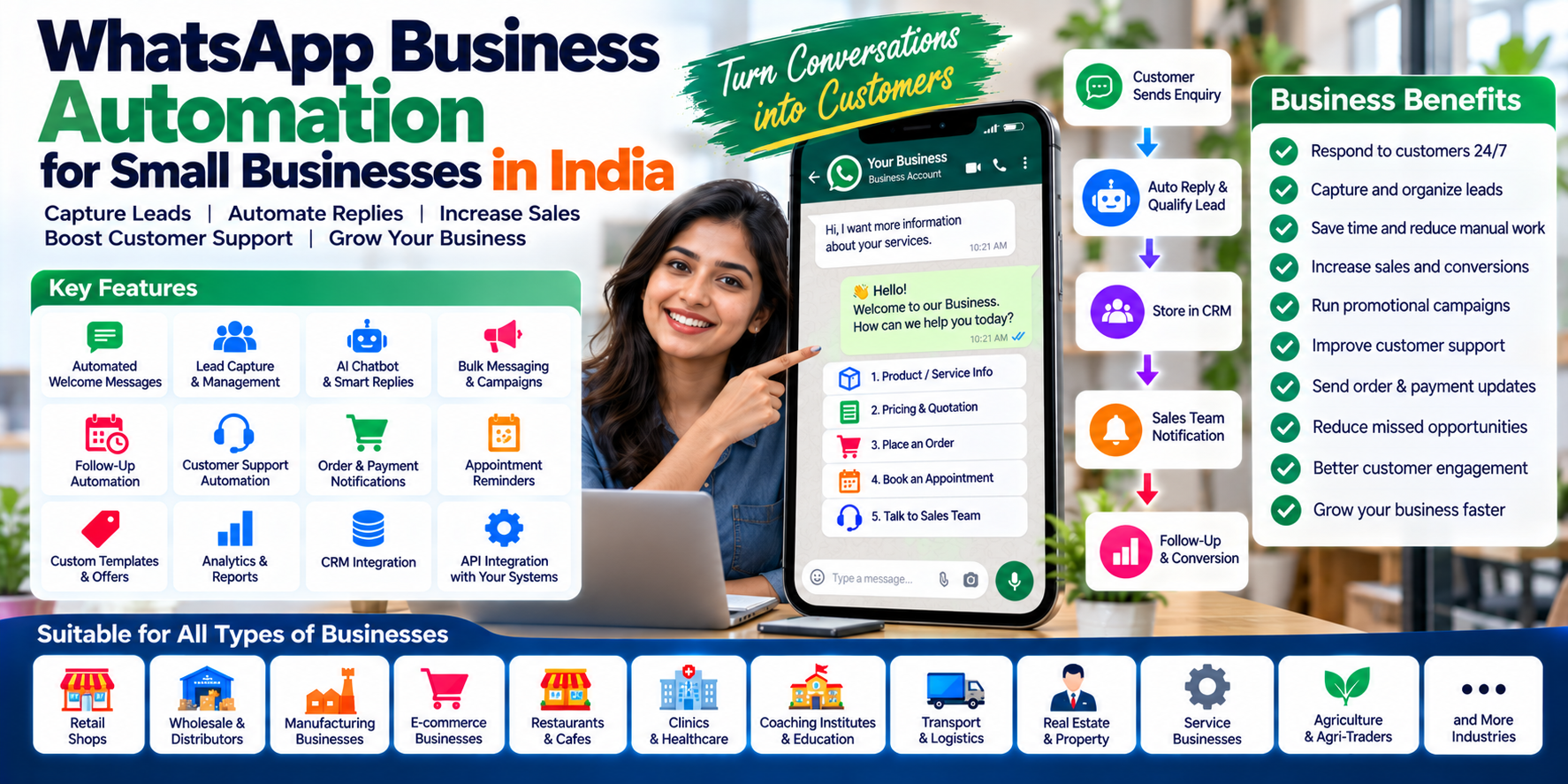
WhatsApp Business Automation for Small Businesses in India: Complete Guide for 2026
For many Indian businesses, WhatsApp has become more than a messaging application. It is increasingly being used for customer enquiries, lead generation, sales conversations, order updates, appointment reminders, customer support and marketing communication.
But managing hundreds or thousands of customer conversations manually can quickly become difficult.
A customer sends a message.
Someone has to reply.
Another customer asks for a quotation.
Someone has to send it.
A lead says, "I will decide later."
Someone needs to remember to follow up.
A customer places an order.
Someone needs to send the confirmation.
This is where WhatsApp Business automation can make a major difference.
Instead of treating WhatsApp as only a chat application, businesses can connect it with their website, CRM, sales process and other business systems to create a structured communication workflow.
Meta's WhatsApp Business Platform supports business messaging through APIs, and its ecosystem is evolving toward more sophisticated automated and AI-assisted conversations.
What Is WhatsApp Business Automation?
WhatsApp Business automation means using software, APIs, workflows, chatbots or integrated business systems to automatically perform repetitive WhatsApp communication tasks.
For example:
Customer sends enquiry → system captures lead → automatic reply → salesperson notified → follow-up reminder → quotation sent → customer receives update.
Instead of every step being performed manually, software can automate appropriate parts of the process.
Common examples include:
- Automated welcome messages
- Lead capture
- Automated FAQs
- Appointment reminders
- Order confirmations
- Payment reminders
- Follow-up messages
- Promotional campaigns
- Customer support
- Sales notifications
- Delivery updates
- Feedback requests
- Internal team notifications
The goal isn't necessarily to replace human communication. The goal is to reduce repetitive work while helping employees respond faster and more consistently.
Why WhatsApp Automation Matters for Indian Businesses
Indian businesses often communicate with customers through WhatsApp because it is convenient and familiar.
A customer may not want to:
- Fill out a long contact form
- Download another application
- Create an account
- Send an email
- Wait for a callback
They may simply send:
"Price?"
or
"Available?"
or
"Send details."
That creates an opportunity for businesses to respond immediately.
Automation can help businesses turn these simple conversations into structured customer journeys.
WhatsApp Automation vs Manual WhatsApp
The difference becomes obvious as the customer base grows.
| Manual WhatsApp | Automated WhatsApp |
|---|---|
| Employee replies manually | Automated first response |
| Leads may be forgotten | Leads stored systematically |
| Follow-ups depend on staff | Follow-ups can be scheduled |
| Difficult to track conversations | Conversations can be organized |
| Repetitive questions consume time | FAQs can be automated |
| Campaigns require manual effort | Campaign workflows can be created |
| Limited reporting | Communication analytics |
| Difficult to scale | Designed for larger volumes |
Automation becomes especially useful when a business receives enquiries outside normal working hours.
10 Important WhatsApp Business Automation Features
1. Automated Welcome Messages
When a new customer contacts the business, the system can immediately respond.
For example:
Hello! 👋 Welcome to ABC Furniture. How can we help you today?
Then provide options such as:
- Product Information
- Price & Quotation
- Place an Order
- Talk to Sales
- Customer Support
This gives the customer a clear starting point.
2. WhatsApp Lead Capture
One of the biggest advantages of WhatsApp automation is converting conversations into structured leads.
A system can capture information such as:
- Customer name
- Phone number
- Requirement
- Product/service
- Location
- Lead source
- Salesperson
- Follow-up status
Instead of having important prospects buried inside a chat list, the business can organize them inside a lead-management system.
3. Automated Lead Follow-Up
This is one of the most valuable use cases.
Suppose someone asks about a website development service but doesn't purchase immediately. The system can help create a follow-up workflow.
Day 0: Enquiry received
↓
Day 1: Send additional information
↓
Day 3: Follow up
↓
Day 7: Send relevant offer or reminder
↓
Salesperson: Takes over when required
The exact workflow should depend on the business and customer relationship rather than sending unnecessary messages.
4. Automated Customer Support
Businesses receive the same questions repeatedly.
For example:
- What are your timings?
- Where are you located?
- What is the price?
- Do you provide delivery?
- What documents are required?
- How long does delivery take?
- How can I book an appointment?
These questions can often be handled through automated responses.
More complex questions can then be transferred to a human employee.
Meta's WhatsApp Business policies allow automation during the customer-service window but also require businesses to provide clear escalation paths to human support or other support channels.
5. WhatsApp Chatbot
A chatbot can interact with customers using predefined conversation flows.
For example:
Customer:
"I want a demo."
Bot:
"Sure. Which product are you interested in?"
Customer:
"School software."
Bot:
"Please select an option."
- Request Demo
- Pricing
- Features
- Talk to Sales
This can qualify the enquiry before a salesperson joins the conversation.
6. WhatsApp Marketing Automation
WhatsApp can also become part of a broader marketing strategy.
Businesses can use appropriate WhatsApp communication for things such as:
- New product announcements
- Offers
- Event invitations
- Service reminders
- Existing customer updates
- Promotional campaigns
- Seasonal campaigns
- Re-engagement
However, businesses should not treat automation as permission to spam customers.
WhatsApp Business messaging is governed by Meta's policies, including requirements around approved templates for certain business-initiated conversations and customer consent/data responsibilities.
7. Order and Payment Notifications
WhatsApp automation can connect communication with business transactions.
Order Received
↓
Payment Confirmed
↓
Order Processing
↓
Order Dispatched
↓
Order Delivered
The customer receives relevant updates without employees manually sending every notification.
This can be useful for:
- E-commerce
- Retail
- Restaurants
- Distributors
- Manufacturers
- Service businesses
8. Appointment Reminders
Appointment-based businesses can use WhatsApp automation for:
- Booking confirmation
- Appointment reminder
- Rescheduling information
- Cancellation confirmation
- Follow-up message
- Feedback request
Potential users include:
- Clinics
- Salons
- Consultants
- Coaching institutes
- Service centres
- Repair businesses
- Professional services
9. WhatsApp + CRM Integration
WhatsApp becomes much more powerful when it is connected to a CRM.
Instead of:
WhatsApp → Conversation
You can create:
WhatsApp → Lead → CRM → Salesperson → Follow-Up → Conversion
A CRM integration can help businesses maintain information about:
- New leads
- Existing customers
- Previous conversations
- Sales stage
- Follow-up dates
- Assigned employees
- Products of interest
- Conversion status
This creates a more complete view of the customer.
10. AI-Powered WhatsApp Automation
The next evolution is combining WhatsApp automation with AI.
Instead of only following fixed rules, AI-based systems can potentially understand customer questions, identify intent, provide appropriate information and route conversations.
Meta has been actively developing business-agent capabilities that can help businesses use AI agents inside messaging conversations for activities such as answering questions, recommending products, qualifying leads and supporting customers.
For example:
Customer:
"I need a website for my coaching institute. What will it cost?"
An AI-assisted system could understand that the customer is asking about:
- Service: Website Development
- Business Type: Coaching Institute
- Intent: Pricing
- Next Action: Sales enquiry
The system could then provide approved information or transfer the conversation to a salesperson.
WhatsApp Automation for Different Industries
Retail Businesses
Retailers can automate:
- Product enquiries
- Offers
- Order confirmations
- Delivery updates
- Customer follow-ups
Restaurants
Restaurants can use WhatsApp for:
- Menu sharing
- Table enquiries
- Order notifications
- Offers
- Customer feedback
Coaching Institutes
Coaching businesses can automate:
- Course enquiries
- Fee information
- Demo class information
- Admission follow-ups
- Student/parent communication
Schools
Schools can use integrated communication systems for:
- Announcements
- Fee reminders
- Attendance notifications
- Events
- Parent communication
Clinics
Clinics can automate:
- Appointment confirmations
- Reminders
- Follow-up communication
- General enquiries
Sensitive healthcare information should be handled carefully and according to applicable regulations and platform policies.
Real Estate Businesses
Property businesses can use WhatsApp automation for:
- New property enquiries
- Requirement collection
- Property recommendations
- Site-visit scheduling
- Lead follow-up
Transport & Logistics
Transport businesses can automate:
- Booking updates
- Delivery notifications
- Customer communication
- Driver/customer updates
WhatsApp Automation for Small Businesses
You don't need to be a large enterprise to benefit from automation.
A small business might start with just:
Website → WhatsApp → Lead Capture → Automatic Reply → Sales Follow-Up
Later, it can expand into:
WhatsApp → CRM → Marketing → Sales → Payment → Support → Analytics
This makes automation scalable.
Start with repetitive tasks rather than trying to automate everything at once.
WhatsApp Automation for Businesses in Hansi, Hisar & Haryana
Local businesses can particularly benefit from WhatsApp because many customer interactions happen through direct conversations.
For businesses in Hansi, Hisar, Bhiwani, Rohtak, Jind and other Haryana cities, WhatsApp automation can support local lead generation and customer communication.
For example:
Google/Instagram/Facebook Ad
↓
Landing Page
↓
WhatsApp Enquiry
↓
Automated Qualification
↓
CRM Lead
↓
Salesperson
↓
Follow-Up
↓
Customer
This creates a connected digital sales process instead of relying entirely on manual WhatsApp conversations.
WhatsApp Automation for Lead Generation
A practical lead-generation workflow could look like this:
Step 1 — Customer Sees Advertisement
The customer clicks an advertisement.
Step 2 — Customer Starts WhatsApp Conversation
The customer asks about the product or service.
Step 3 — Automated Response
The system responds immediately.
Step 4 — Lead Qualification
The system asks a few relevant questions.
Step 5 — CRM Entry
The information is stored as a lead.
Step 6 — Salesperson Notification
The responsible employee receives the lead.
Step 7 — Follow-Up
The sales team continues the conversation.
Step 8 — Conversion
The customer purchases or books the service.
This is where WhatsApp stops being just a messaging channel and becomes part of the sales funnel.
What Is WhatsApp API?
For businesses that need more advanced automation, integrations can be built around the WhatsApp Business Platform and its APIs.
An API allows business software to communicate with WhatsApp programmatically.
This makes it possible to connect WhatsApp with systems such as:
- CRM
- Website
- E-commerce platform
- Accounting software
- POS
- Appointment system
- School software
- Hospital software
- Inventory system
- Customer support software
Meta continues to expand the WhatsApp Business Platform, including APIs for business messaging and calling.
WhatsApp Automation Software vs WhatsApp Business App
The standard WhatsApp Business app can be useful for smaller operations. But businesses requiring advanced workflows may need a more structured software layer.
WhatsApp Business App
Suitable for:
- Small customer volumes
- Basic communication
- Basic business profile
- Manual conversations
- Simple automated responses
WhatsApp Automation Platform
More suitable for:
- Multiple sales employees
- Lead management
- Automated workflows
- Campaign management
- CRM integration
- Analytics
- API integrations
- Advanced customer journeys
- AI-assisted conversations
The right choice depends on business size, communication volume and automation requirements.
What Should You Automate First?
A common mistake is trying to automate everything immediately.
Instead, identify repetitive activities.
Start with:
- Priority 1: Frequently asked questions
- Priority 2: Lead capture
- Priority 3: Lead notifications
- Priority 4: Follow-up reminders
- Priority 5: Order/service notifications
- Priority 6: Customer feedback
- Priority 7: Marketing workflows
This approach makes implementation easier and allows the business to measure the value of each automation.
How Much Does WhatsApp Automation Cost in India?
There isn't one universal price.
The total cost can depend on:
- Software platform
- WhatsApp Business Platform setup
- API usage
- Message categories
- Message volume
- Number of users
- CRM integration
- Chatbot complexity
- AI functionality
- Custom development
- Hosting
- Third-party services
- Campaign requirements
Businesses should therefore compare the total workflow cost, not simply the monthly software subscription.
For a simple business, a basic automation setup may be enough.
For a larger company, a custom WhatsApp + CRM + automation platform may provide significantly more flexibility.
Important WhatsApp Automation Compliance Considerations
Automation should not mean uncontrolled bulk messaging.
Businesses need to pay attention to:
- Customer consent
- WhatsApp Business policies
- Message-template requirements
- Data protection
- Appropriate message frequency
- Customer support escalation
- Sensitive information
- Applicable Indian laws and regulations
WhatsApp's current business policy places requirements on business-initiated messaging, approved templates, customer data and support escalation.
A good automation system should therefore include controls, not just sending capabilities.
How Cycode Technologies Can Help
Businesses often don't need another isolated software tool. They need WhatsApp to work with their existing business process.
At Cycode Technologies, WhatsApp automation can be approached as part of a broader digital system involving:
- WhatsApp automation
- Lead management
- CRM
- Website integration
- Customer support
- Marketing automation
- Sales workflows
- API integration
- Custom software
- AI-powered automation
Cycode's Wamebo platform is specifically positioned around WhatsApp marketing and business communication, while custom development can be used when a business requires deeper integration with its existing software ecosystem.
The Future of WhatsApp Business Automation
WhatsApp automation is moving beyond simple autoresponders.
The direction is increasingly toward:
Messaging + CRM + Automation + AI + Commerce
Future business workflows can involve AI-assisted conversations that understand customer intent, recommend products, qualify leads, answer questions and hand complex cases to human employees.
Meta's 2026 business-agent initiatives demonstrate this broader shift toward AI-powered business conversations inside messaging environments.
The businesses that benefit most will not necessarily be those sending the most messages.
They will be those creating better customer journeys.
Final Thoughts
WhatsApp has already become an important communication channel for businesses in India.
The next step is turning that communication into a structured business process.
With the right combination of:
WhatsApp + Automation + CRM + AI + Human Support
businesses can reduce repetitive work, respond faster, organize leads and create more consistent customer experiences.
For small businesses in Hansi, Hisar, Haryana and across India, WhatsApp automation can be a practical starting point for building a more connected digital sales and customer-support system.
Frequently Asked Questions
What is WhatsApp Business automation?
It is the use of software, APIs and workflows to automate appropriate business communication and processes through WhatsApp.
Is WhatsApp automation useful for small businesses?
Yes. Small businesses can start with simple automation such as FAQs, lead capture, customer notifications and follow-up workflows.
What is WhatsApp API?
The WhatsApp Business Platform provides APIs that allow businesses and software systems to integrate WhatsApp communication into their applications and workflows.
Can WhatsApp automation generate leads?
Yes. A business can connect advertisements, websites and WhatsApp conversations with lead-capture and CRM workflows.
Can WhatsApp automation use AI?
Yes. AI can be integrated into business workflows to assist with questions, qualification, recommendations, routing and customer support, subject to the capabilities and policies of the platform.
Is WhatsApp bulk messaging the same as automation?
No. Automation is broader than bulk messaging. It can include lead capture, customer support, notifications, workflows, CRM integration and personalized communication.
Can WhatsApp integrate with CRM software?
Yes. WhatsApp Business Platform integrations can connect conversations and business workflows with CRM and other software systems.
How much does WhatsApp automation cost in India?
Cost depends on the platform, messaging usage, integrations, automation complexity and whether custom software or AI functionality is required.